


.png)
Your Guide to Wix Studio Templates
Wix Studio templates are much more than just pretty layouts. Think of them as a professional architect's blueprint for your website—a sophisticated foundation packed with advanced customization and responsive design features right out of the box. They give agencies and freelancers a massive head start, providing the framework to build stunning, high-performance client sites without starting from a blank canvas.
What Are Wix Studio Templates?
Unlike the standard templates you might find on classic Wix, which are built for simplicity, Wix Studio templates are designed as powerful launchpads for more complex, bespoke web projects. They’re built for creators who demand a robust framework but don’t want to be boxed in by the usual constraints of a theme. The result? Total design freedom without sacrificing efficiency.
The real magic is in the tech. These templates are built on a much more advanced editor that’s loaded with features made for a professional workflow—it's a serious upgrade from the classic builder.
The Professional's Choice
For pros like us, that distinction is everything. It means we can deliver highly customized, scalable websites for our clients way faster than if we were coding from scratch. A few game-changing features really set these templates apart:
Responsive AI: This isn't your average mobile-friendly setting. The AI helps automatically adjust your designs for any screen size, making sure the experience is flawless on every device.
Fluid Animations: You can create incredibly slick, engaging animations and interactions without touching a single line of code.
Advanced Layout Tools: Get pixel-perfect control over every single element with tools like grids, stacks, and responsive sizing that just work.
Wix Studio was clearly engineered to fill the gap between easy-to-use website builders and code-heavy platforms. It hits that sweet spot of speed and creative power, making it the perfect tool for modern web designers.
The shift toward these more powerful tools is undeniable. As of early 2025, Wix Studio now accounts for a whopping 20% of all new sign-ups on the platform. That’s a huge indicator that designers and businesses are demanding more from their web-building experience.
Wix Classic vs Wix Studio Templates At a Glance
To really get a feel for the upgrade, it helps to see the differences side-by-side. Here’s a quick rundown of how Wix Studio templates stack up against the classic ones.
Feature | Wix Classic Templates | Wix Studio Templates |
|---|---|---|
Primary User | DIYers, small business owners | Agencies, freelancers, pros |
Design Control | Good, but within set boundaries | Granular, pixel-perfect control |
Responsiveness | Automatic, with limited tweaks | AI-assisted, fully customizable |
Animations | Basic pre-set animations | Complex, code-free interactions |
Collaboration | Limited team features | Built-in client feedback & team roles |
Custom Code | Basic HTML/JS embedding | Full CSS control, Velo integration |
As you can see, while Classic is great for getting a simple site online quickly, Studio is built for professionals who need to deliver top-tier, custom results.
To really understand where Wix Studio fits in the broader professional landscape, it's worth checking out a detailed comparison of Wix Studio versus Webflow. It gives you some great context on its strengths and market position.
And if you’re ready to see what’s possible, feel free to dive into our full collection of https://www.dllstudios.com/category/wix-studio-templates to get inspired.
Choosing the Right Wix Studio Template
Picking a Wix Studio template isn't just about finding a pretty design. It's one of the most important strategic decisions you'll make for the entire project. The right template is a launchpad—a solid, flexible foundation that accelerates your build. The wrong one? It’s a creative straitjacket that leaves you fighting the layout at every turn.
The trick is to stop thinking about aesthetics first and start with architecture. Before you even lay eyes on the template library, you need a crystal-clear project strategy. That means sitting down with your client to pin down their business goals, who they’re trying to reach, and exactly what the website needs to do. Without that roadmap, you’re just window shopping.
Define Your Project's Core Needs
A solid strategy keeps you from getting distracted by flashy designs that don't actually serve the project's purpose. Start by getting answers to these questions:
What's the #1 goal? Is it getting someone to book a service, buy a product, or fill out a form? This defines the entire user journey.
Who is this for? A website for a corporate law firm has completely different structural needs than one for a freelance photographer.
What are the must-have features? Does the site need a blog, an e-commerce store, a booking system, or a members-only area? Knowing this from the jump narrows your options in a good way.
Nailing these down first ensures that function drives your decision, not just form. It saves you from countless hours of backtracking later.
A great template doesn't just look good—it comes pre-wired with the logic and layout that supports the client's business. Think of it as choosing a vehicle; you wouldn't pick a two-seater sports car to haul construction materials.
How to Properly Evaluate a Template
Once you have your strategy, you can start digging into the Wix Studio templates with a critical eye. When you're in preview mode, you have to look past the placeholder images and generic copy. Focus on the bones of the template and its potential.
How does it behave out of the box? Use your browser's dev tools to check its responsive behavior. A well-built template will already have intelligent breakpoints and fluid scaling baked in, giving you a massive head start. Take a hard look at its pre-built sections—things like portfolio galleries, service pages, or e-commerce layouts. These should feel like a solid starting point, not something you’ll have to rip out and rebuild from scratch.
Ultimately, choosing the right Wix Studio template is about finding that sweet spot between pre-built convenience and creative freedom. When you start with a clear strategy and evaluate a template's core architecture, the design you choose becomes a powerful asset that helps you build a better, more effective website for your client.
Top Wix Studio Templates by Industry
Picking the right Wix Studio template is a lot like choosing the foundation for a new house—it has to be the right fit for the job. While you can technically make almost any template work, some are just built differently, designed from the ground up to meet the specific demands of certain industries. This isn't just a list; it's a breakdown of the best templates out there, showing you exactly how their features solve real-world client problems.
We're going to dig into why certain templates are perfect for creative agencies, e-commerce shops, and professional services. Think of this as a visual guide to understanding their strategic perks, so you can pick a design that starts delivering from day one.
Templates for Creative Agencies
Creative agencies live and die by their image. Their websites can't just be functional; they have to be an extension of their creativity. These templates are all about making a statement with bold visuals, unexpected layouts, and interactive elements that hook visitors immediately. It's a portfolio, a brand statement, and a sales pitch all rolled into one.
Look for features that tell a story without saying a word:
Full-screen video backgrounds: Nothing grabs attention faster or sets a mood more effectively.
Asymmetrical grids: Ditch the boring, boxy look for something more artistic and memorable.
Advanced parallax effects: These add a sense of depth as users scroll, making the entire site feel more dynamic and alive.
A great agency template might include subtle touches like an oversized, sticky cursor or slick page transitions that make browsing a portfolio feel like an experience. It's these little details that make a creative site stand out from the crowd.
E-commerce and Retail Templates
When it comes to an online store, a template has one primary job: sell stuff. That means it needs to look great, be dead simple to navigate, and be fine-tuned for conversions. The best e-commerce Wix Studio templates manage to blend beautiful product showcases with a checkout process so smooth, customers barely notice it.
The flowchart below breaks down a simple three-step process—Strategy, Evaluation, and Customization—that works for any project, ensuring you pick the right template from the start.
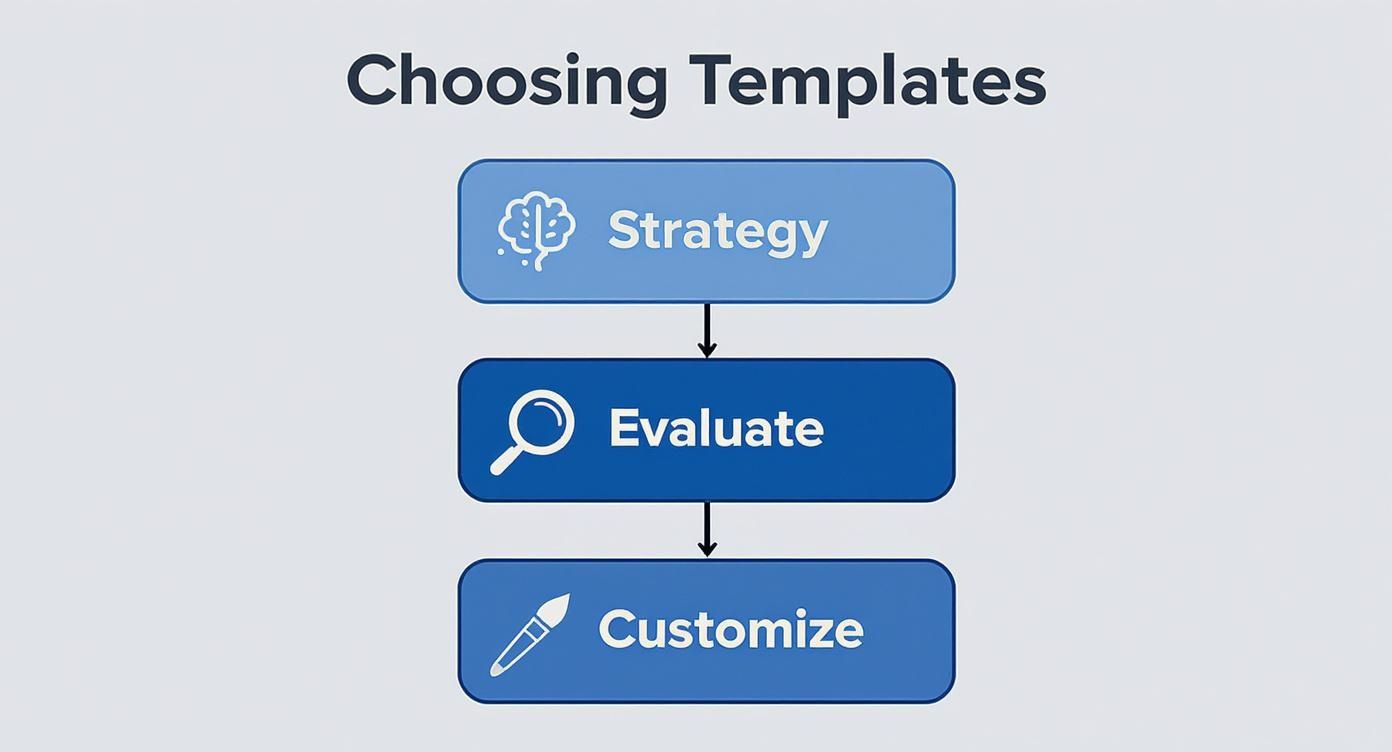
This framework forces you to align a template’s features with your actual business goals before you even think about design. For an online store, that means finding a template built to sell.
The most effective e-commerce templates make the products the hero. They use clean layouts, high-quality image support, and intuitive filtering options to remove any friction between the customer and the purchase.
Must-have features include things like pre-designed product galleries, quick-view options, and a rock-solid integration with Wix Stores. You absolutely need a template with a big, obvious "Add to Cart" button and a crystal-clear checkout flow. With cart abandonment rates hovering around 70%, you can't afford any confusion.
To help you narrow down the essentials, here’s a quick checklist of features to look for based on your industry.
Template Feature Checklist by Industry
Industry | Essential Feature 1 | Essential Feature 2 | Nice-to-Have Feature |
|---|---|---|---|
Creative Agency | High-Res Portfolio Gallery | Unique Page Transitions | Interactive Cursor Effects |
E-commerce | Quick-View Product Modal | Advanced Product Filtering | Customer Wishlist Functionality |
Restaurant | Online Menu System | Integrated Reservations | Online Ordering Integration |
Consultant | Prominent Contact Form | Service Packages Layout | Case Study/Testimonial Slider |
Photographer | Full-Screen Image Sliders | Client Proofing Galleries | Watermarking for Images |
This table isn't exhaustive, but it's a great starting point to ensure the template you choose has the core functionality your business needs to succeed.
Professional Services Templates
For consultants, lawyers, or financial advisors, a website has to scream "trustworthy" and "expert" from the moment it loads. The design needs to be clean, professional, and laser-focused on guiding potential clients to the right information and a clear call to action. Clarity trumps flashy effects every time in this space.
Here are the non-negotiables for a professional services site:
Prominent contact forms: Don’t make people hunt for a way to get in touch.
Integrated booking systems: Let visitors schedule a consultation right on the site. It’s a game-changer for service businesses.
Clear service descriptions: Use smart layouts like tabs or accordions to present detailed info without creating a wall of text.
A top-tier template for this niche will have a logical flow, walking users from the homepage to a services page, then over to case studies or testimonials, and finally to a contact page to seal the deal. This structured journey is what builds credibility and turns a casual visitor into a qualified lead. Matching the template’s strengths to your industry's needs is the first, and most important, step to a successful project.
Making a Template Truly Yours
A killer Wix Studio template is a fantastic launchpad, but it's not the final destination. Think of it like buying a great suit off the rack—it looks good, but the real magic happens in the tailoring. This is where you take a high-quality design and transform it into a digital experience that’s unmistakably your client's.

The aim is to make the finished product feel completely custom, not like a template with a new coat of paint. Wix Studio's editor was built for this, giving you pinpoint control over every little detail to inject the brand’s soul into the site. You can start with a solid foundation, like our Creative Agency Site Wix Studio Template, and then strategically pull it apart and put it back together to fit a specific vision.
This goes way beyond just changing a few colors and fonts. We're talking about fundamentally reshaping the template's look and feel to build a deliberate, one-of-a-kind user experience.
Start with the Global Style Guide
Your first stop—and the one that will have the biggest impact—is the global style guide in the Wix Studio editor. This is your mission control for brand consistency. Forget about changing text styles or button colors one by one on every page. Here, you define them once for the entire site.
By setting up your client’s typography scales, color palettes, and button styles in this central hub, you guarantee that every new thing you add automatically gets the right branding. It's a massive time-saver, but more importantly, it ensures the whole site looks cohesive and professional. This is the single most powerful move you can make to lock in brand integrity.
Bend the Layout with Grids and Stacks
This is where you really start to break away from the template’s original bones. Wix Studio's advanced layout tools, especially CSS Grid and Stack, let you create dynamic, compelling layouts that feel anything but cookie-cutter.
Grid: Use the grid to arrange elements in cool, asymmetrical layouts that draw the eye where you want it to go. It’s perfect for breaking out of the boring, blocky website structure and creating something visually interesting.
Stack: A stack is just a flexible container that groups elements together, either vertically or horizontally. It’s fantastic for making sure related content—like an icon, a headline, and a paragraph—always stays perfectly aligned and scales just right on every device.
Think of the grid as the architectural blueprint for your page. Stacks are like the perfectly arranged furniture inside. Using them together gives you total command over spacing, alignment, and responsiveness, letting you build layouts that are both beautiful and bulletproof.
Add a Final Polish with Custom Animations
The last layer of personality comes from motion. Smart, subtle animations can turn a static page into an engaging story. The great thing about Wix Studio is that you can add custom interactions without touching a line of code.
You can make elements fade in as someone scrolls, reveal themselves on hover, or move with a parallax effect. When used with a clear purpose, these little movements can highlight important information, guide the user, and create an experience that sticks with them. The trick is to be intentional—animations should always support the content, not distract from it.
By pulling all these techniques together, you can take any Wix Studio template and elevate it into a digital asset that’s truly unique and all about the brand.
Optimizing Your Template for SEO and Performance
Let's be honest, a beautiful website that nobody can find is just a pretty picture. The real magic happens when your stunning design is also fast, responsive, and easy for search engines to discover. This is where optimizing your Wix Studio template for performance and SEO turns your site from a digital brochure into a lead-generating machine.
Before we jump into the nuts and bolts of tweaking your template, it’s worth taking a moment for a quick primer on understanding what Search Engine Optimization (SEO) entails. Getting the basics down will help you see how every little change we make contributes to climbing the search rankings and pulling in more organic traffic.
Mastering On-Page SEO in Wix Studio
One of the best things about Wix Studio is that it comes loaded with a powerful, built-in SEO suite. This gives you direct control over how search engines like Google interpret your site. We're not just talking about stuffing keywords everywhere; this is about structuring your content so it’s crystal clear to both people and search engine bots.
Your first stop should be the essential on-page elements. Think of these as the signposts that tell search engines what each page is all about.
Meta Tags: Take the time to write compelling meta titles and descriptions for every single page. This is your site's ad on the search results page, and it’s your best shot at convincing someone to click.
Header Tags (H1, H2, H3): Use headers to build a logical outline for your content. Your H1 is the main headline, with H2s and H3s breaking down the sub-topics. This makes your content way easier for visitors and search crawlers to digest.
Structured Data: Get familiar with schema markup. By adding it to things like your services, products, or local business info, you help Google create those fancy "rich snippets" in search results that really grab attention.
Think of your website's SEO as its own language. By fine-tuning your meta tags and structured data, you're not just speaking to Google—you're speaking its preferred dialect. This makes it much easier for the algorithm to understand your content and rank it where it belongs.
Boosting Site Speed and Performance
Online, speed is everything. A slow website doesn't just annoy visitors—it can actively hurt your search rankings. Wix Studio is built on a performance-first architecture, but the choices you make with your content can make or break your site's speed.
The biggest culprit? Large, uncompressed images. This is the number one reason for slow load times. Always use Wix Studio’s built-in image optimization tools, or better yet, compress your images before you upload them. You can dramatically shrink file sizes without losing visual quality.
Also, be a minimalist with custom scripts and third-party apps. Each one adds a little more weight to your page. Only install what’s absolutely essential to keep the user experience snappy and responsive.
When You Should Go Beyond a Template
While Wix Studio templates give you an incredible head start, some projects just demand a completely custom build. Knowing when to step away from a pre-made design is the key to creating a website that truly works for your business. A custom solution becomes the only real option when your project's needs are simply too complex for a template's built-in features.
Think about situations that require highly specific, non-standard functionality. We're talking about large-scale e-commerce sites with unique inventory management, platforms needing tricky API integrations with third-party software, or detailed migrations from another CMS like WordPress. If your vision includes things like bespoke user portals or features that don't exist off the shelf, it’s a clear sign you need to go custom. To really get a feel for the platform's power, check out our guide on why upgrading from Wix Classic to Wix Studio is essential.
Pushing the Platform to Its Limits
For businesses with these kinds of sophisticated needs, bringing in a professional agency is the logical next move. Our team at DLL Studios thrives on pushing the boundaries of the Wix Studio platform. We build websites that are not only powerful and scalable but also perfectly aligned with your specific business goals.
A template gives you the blueprint, but a custom solution builds the skyscraper. It’s for projects where every single detail must be intentionally designed and engineered for a specific purpose, guaranteeing a perfect fit for your brand and operations.
Los Angeles is at the center of our service area, and we proudly support clients across a wide network of surrounding cities and neighborhoods throughout Southern California. Our reach includes every corner of L.A.—from Downtown Los Angeles, Hollywood, West Hollywood, Beverly Hills, and Santa Monica to the beach communities of Malibu, Venice, Marina del Rey, Hermosa Beach, Manhattan Beach, and Redondo Beach. We also extend service through the San Fernando Valley, including Sherman Oaks, Studio City, Encino, Van Nuys, North Hollywood, Burbank, Glendale, Pasadena, Woodland Hills, Chatsworth, Canoga Park, Reseda, Northridge, and Tarzana. In the San Gabriel Valley, we work with clients in Alhambra, Monterey Park, San Gabriel, Temple City, Rosemead, Arcadia, El Monte, South El Monte, West Covina, Covina, Baldwin Park, Azusa, Glendora, Duarte, and Monrovia. Farther southeast, we serve Whittier, Pico Rivera, Downey, Norwalk, La Mirada, La Habra, and Cerritos. We also support the South Bay—including Torrance, Carson, Gardena, Hawthorne, Inglewood, and Long Beach—as well as the Gateway Cities and communities throughout the I-10, I-5, 101, and 405 corridors. Whether you’re in a major metro area or a smaller surrounding neighborhood, our team delivers reliable, high-quality service anywhere in or around Los Angeles.
Got Questions About Wix Studio Templates?
Thinking about diving into Wix Studio? It’s a powerful platform, but it’s natural to have a few questions before you start. We get asked these all the time, so let’s clear things up and give you the straightforward answers you need.
Can a Beginner Really Use a Wix Studio Template?
Honestly, while Wix Studio is built with professionals in mind, a determined beginner who has a good eye for design could probably manage a basic site. The templates give you a fantastic head start.
But let's be real: the editor itself has a much steeper learning curve than the classic Wix you might be used to. If you’re aiming for a truly polished, high-performing website that doesn't scream "DIY," bringing in an agency is almost always the faster and more effective path.
Are Wix Studio Templates Mobile-Friendly?
Yes, and this is one of the platform's biggest selling points. Every single template is designed to be fully responsive right out of the box, thanks to some seriously impressive responsive AI.
But it gets better. The editor also gives you granular control over every breakpoint. That means you can manually tweak the design to make sure it looks absolutely perfect on any device, from a massive desktop monitor all the way down to the smallest smartphone screen.
Think of the responsive behavior in Wix Studio as "intelligently automatic." It does most of the heavy lifting for you but still gives you the keys to make precise adjustments exactly where you need them.
Can I Sell Products with These Templates?
Definitely. A lot of Wix Studio templates are built specifically for e-commerce and plug right into Wix’s powerful suite of business tools.
You have two great options here: you can either pick a template that already has a store built-in, or you can add full e-commerce functionality to any template you like. This kind of flexibility makes Wix Studio a fantastic choice for building an online store that can really grow with your business.
Ready to build a website that goes beyond the template? The team at DLL Studios specializes in creating custom, high-performance Wix Studio sites that drive real results. Visit us online to learn more and schedule your free consultation.



