


.png)
How to Improve Website Speed and Boost Your SEO
Let's be blunt: a slow website is a silent business killer. It's easy to dismiss performance as just another technical task for the IT team, but its impact hits your bottom line directly. Whether you're running an e-commerce shop in Glendora or a service-based business in Los Angeles, every single millisecond counts.
Why a Fast Website Is Your Strongest Business Asset

You have to start thinking of your website's performance less as an IT chore and more as a core pillar of your customer service. A fast, zippy site tells customers you value their time and delivers a seamless, professional experience. A sluggish one, on the other hand, just creates frustration and quietly encourages them to check out a competitor in a nearby neighborhood like Pasadena or Sherman Oaks.
The Financial Drain of a Slow Site
The connection between speed and revenue is undeniable. If you're running a small e-commerce store, every second your site takes to load is actively costing you customers. It’s not an exaggeration. The numbers show that a staggering 40% of shoppers will bail on an e-commerce site if it takes more than three seconds to load.
That means nearly half your potential buyers—from Hollywood to Hermosa Beach—are gone before they even get a chance to see your products. This is precisely why learning how to improve website speed is a non-negotiable investment in your business.
When you dig a little deeper, the data gets even more compelling. Sites that manage to shave off just one second in load time see a 5.6% boost in conversion rates. Even more dramatic, sites loading in one second convert at rates five times higher than those taking ten seconds. The case for prioritizing performance is crystal clear.
Speed as a Ranking Signal
Beyond just keeping users happy, speed is a huge deal for search engine visibility. It’s a critical ranking factor for Google. A faster website naturally leads to better engagement metrics—think lower bounce rates and people sticking around longer—which Google’s algorithm interprets as a sign of a high-quality, valuable resource.
Improving your site's speed is one of the most direct ways to improve your search engine rankings. If you're looking to tackle performance issues head-on, a Fast SEO Fix can help you quickly address the technical problems holding back your visibility.
Pinpointing What Is Slowing Your Website Down
Before you can fix a slow website, you have to play detective. Trying to boost your site’s speed without knowing the root cause is like trying to fix a car engine with a blindfold on. The first step is always diagnosis, and a few usual suspects are almost always responsible for dragging down performance.
Often, the biggest culprits are massive image files. Think of them as digital anchors; a beautiful high-resolution photo meant for a billboard has no place on a website, where it forces visitors in places like Burbank or Santa Monica to wait. Similarly, bloated third-party scripts from ads, analytics, and social media widgets can cripple your site. Each script is like inviting another person into a tiny room—eventually, it gets too crowded to move.
Messy, inefficient code is another common bottleneck. Imagine trying to follow an instruction manual with thousands of unnecessary pages—that’s what a browser does with bulky code. If you want to dive deeper into the code that powers a website's user experience, check out our guide on essential front-end developer technologies.
Understanding Core Web Vitals
To get a real-world picture of performance, Google uses a set of metrics called Core Web Vitals (CWV). These aren't just technical jargon; they measure how a user actually experiences your site. The two most critical are:
Largest Contentful Paint (LCP): This measures how long it takes for the largest piece of content (usually an image or a big block of text) to show up on the screen. An LCP under 2.5 seconds is what you're aiming for.
Interaction to Next Paint (INP): This one tracks how quickly your site responds when someone clicks, taps, or types. A fast response time, under 200 milliseconds, feels snappy and responsive.
How Different Platforms Stack Up
The platform you build on also plays a huge role. A custom-coded site gives you maximum control, but builders like WordPress, Webflow, and Wix Studio each have their own performance quirks. For instance, a WordPress site can be incredibly fast, but it can also be bogged down by poorly coded themes and way too many plugins.
Different platforms come with different starting points for performance. Some are built for speed right out of the box, while others need a bit more TLC to get them running smoothly, especially on mobile devices where connections can be less reliable.
Platform Performance Snapshot Core Web Vitals
Platform | Good Desktop CWV Score | Good Mobile CWV Score |
|---|---|---|
WordPress | 72% | 34% |
Wix | 63% | 27% |
Squarespace | 59% | 23% |
Webflow | 58% | 30% |
This table shows that while most platforms do reasonably well on desktop, mobile performance is where the real work begins. It’s a clear reminder that optimizing for mobile isn’t just a good idea—it’s essential for reaching your audience effectively.
Startups know visibility drives growth, but slow websites kill 88.5% of first impressions before they even form. While the average mobile page takes a painful 27.3 seconds to fully load, pages that load in just one second convert 5 times better and cut bounce rates by 12%. Discover more insights about crucial website statistics.
Practical Ways to Increase Your Website Speed Today
Ready to get your hands dirty and see some real gains in performance? You don't need to be a developer to make a huge impact. Many of the most effective strategies are surprisingly straightforward and can be put into action right away.
Tackle the Low-Hanging Fruit: Images and Code
For most businesses, especially those in visually driven markets from Beverly Hills to Redondo Beach, the first stop is always image optimization. Large, uncompressed images are the number one culprit behind slow load times. Learning how to optimize images for the web is a game-changer for reducing page weight and improving the user experience.
Beyond basic compression, it's time to switch to modern image formats. Using WebP, for example, can make a massive difference. WebP files are typically 25-34% smaller than traditional JPEGs, which means they download much faster for your visitors.
Next up is the code that runs your site—specifically, your CSS and JavaScript files. This is where minification comes in. Think of it as tidying up a messy closet; it’s the process of removing all the unnecessary characters from your code, like spaces and comments, without changing how it functions. The same code is there, but it takes up far less space.
Another powerful technique is leveraging browser caching. This tells a visitor's browser to save a copy of your site's files on their device. When they return, their browser can load the site from that local copy instead of re-downloading everything, creating a nearly instant experience for repeat visitors. It's a small tweak but a cornerstone of any effective website maintenance plan. If you want to build out a more robust strategy, our guide your ultimate website maintenance checklist for 2026 is a great place to start.
This diagram breaks down the ideal performance targets for Google's Core Web Vitals, which directly measure the quality of a user's experience.
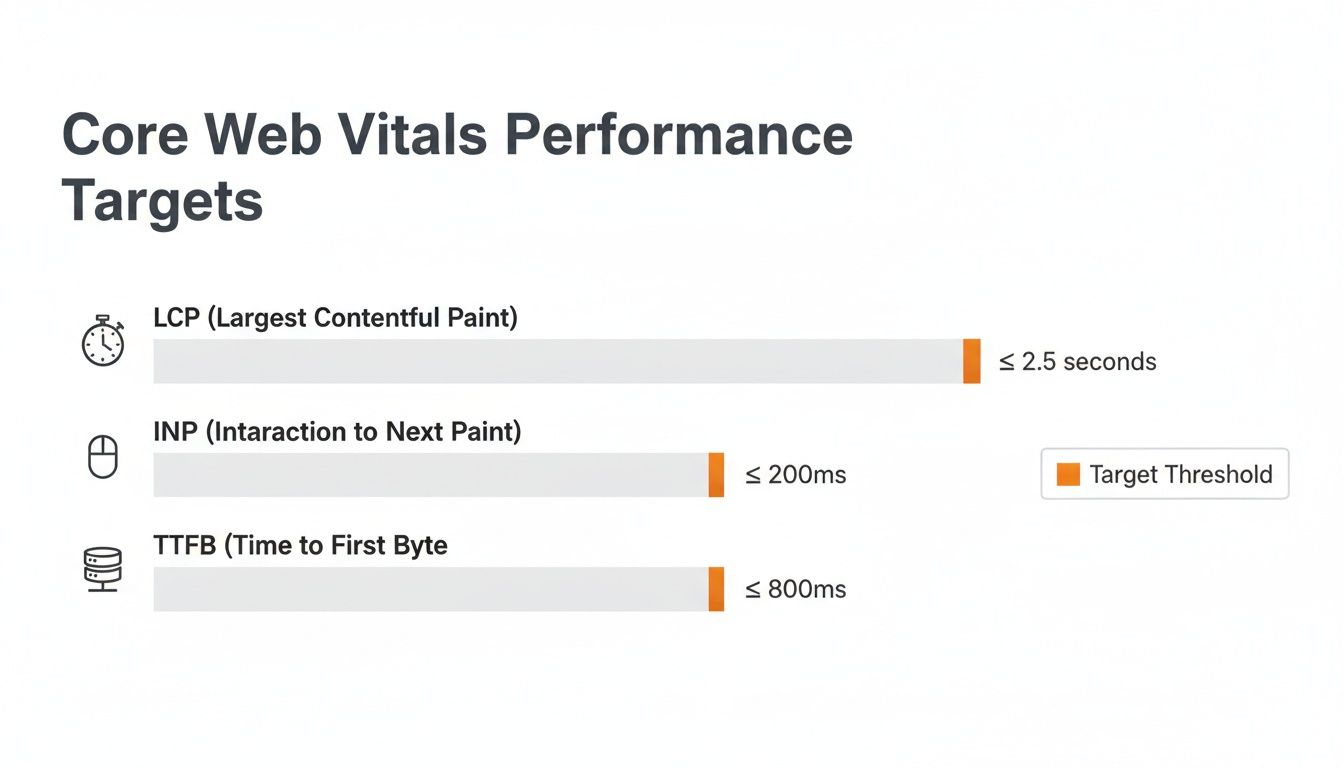
Hitting these targets for metrics like LCP and INP is a clear signal to both users and search engines that you have a high-quality, well-performing site.
Serve Your Content from a Global Network
What if you could make your website feel local to every visitor, no matter where they are in the world? That’s exactly what a Content Delivery Network (CDN) does. A CDN is a globally distributed network of servers that stores copies of your website's assets.
When someone from outside your immediate area visits your site—say, a potential client browsing from across the country—the CDN delivers your content from the server physically closest to them. This dramatically reduces the distance that data has to travel, resulting in a much faster load time for everyone.
By using a CDN, you ensure that a user in another state has the same fast, reliable experience as someone right here in Southern California. It's a fundamental step in scaling your website's performance.
Finding the Right Tools and Knowing When to Call for Backup

While you can make a lot of headway with the DIY fixes we've covered, there comes a point where professional expertise can really open up new levels of performance. Knowing when to bring in an expert is what separates a good website from a truly great one. The journey of learning how to improve website speed often starts with a few powerful, free tools.
You can get a surprisingly detailed picture of your site's health from platforms like Google PageSpeed Insights and GTmetrix. These aren't just for developers; their reports flag specific problems, from a sluggish server to clunky resources that slow everything down. Getting comfortable reading these reports will help you have much smarter conversations about your site’s performance down the line.
When to Bring in a Specialist Agency
Eventually, you'll hit a ceiling with basic plugins and simple tweaks. That’s the perfect time to partner with a specialist agency like DLL Studios. It's a strategic move. Los Angeles is at the center of our service area, and we proudly support clients across a wide network of surrounding cities and neighborhoods throughout Southern California. Our reach includes every corner of L.A.—from Downtown Los Angeles, Hollywood, West Hollywood, Beverly Hills, and Santa Monica to the beach communities of Malibu, Venice, Marina del Rey, Hermosa Beach, Manhattan Beach, and Redondo Beach. We also extend service through the San Fernando Valley, including Sherman Oaks, Studio City, Encino, Van Nuys, North Hollywood, Burbank, Glendale, Pasadena, Woodland Hills, Chatsworth, Canoga Park, Reseda, Northridge, and Tarzana. In the San Gabriel Valley, we work with clients in Alhambra, Monterey Park, San Gabriel, Temple City, Rosemead, Arcadia, El Monte, South El Monte, West Covina, Covina, Baldwin Park, Azusa, Glendora, Duarte, and Monrovia. Farther southeast, we serve Whittier, Pico Rivera, Downey, Norwalk, La Mirada, La Habra, and Cerritos. We also support the South Bay—including Torrance, Carson, Gardena, Hawthorne, Inglewood, and Long Beach—as well as the Gateway Cities and communities throughout the I-10, I-5, 101, and 405 corridors. Whether you’re in a major metro area or a smaller surrounding neighborhood, our team delivers reliable, high-quality service anywhere in or around Los Angeles.
Our data-first approach and hands-on experience with platforms like WordPress and Webflow let us find and fix the really tricky issues. It's a bigger deal than you might think—globally, only 41% of websites manage to get good Core Web Vitals (CWV) scores on mobile. The right platform is a good start, but expert optimization is what really closes the gap, which is something to think about when you discover the best website platform for SEO.
We specialize in helping businesses crush these benchmarks. We do this by implementing advanced backend fixes like server-side caching, meticulous image optimization, and cutting down JavaScript and CSS bloat. You can read the full research on these crucial website speed statistics to see just how much they matter.
For businesses that are serious about leading their market, professional support isn't an expense—it's an investment in growth. We zero in on hitting Google's tough but achievable targets:
Largest Contentful Paint (LCP) under 2.5 seconds
First Input Delay (FID) below 100 milliseconds
Time to First Byte (TTFB) under 0.8 seconds
Getting there requires a custom strategy, not some one-size-fits-all plugin. If you're ready to see what a professional audit can do for your site's speed and user experience, our team at DLL Studios is here to help. For a free consultation, just give us a call at (650) 260-4067.
Your Website Speed Questions Answered
When you start digging into website performance, a lot of questions pop up. It's totally normal to wonder where you should even begin. We've pulled together some of the most common questions we hear from business owners to give you clear, straightforward answers.
How Often Should I Check My Website Speed?
As a general rule, try to test your site's speed at least once a month. This gives you a steady baseline and helps you spot any performance dips before they become a real problem.
That said, you should always run a speed test after making any significant changes. Think installing a new plugin, adding a new feature, or uploading a big batch of photos to your portfolio. For a high-traffic e-commerce store, checking weekly is an even better rhythm to catch issues before they start hurting sales.
Can My Website Theme Really Affect Its Speed?
Absolutely. In fact, a bloated, poorly coded theme is one of the most common speed killers out there. We see it all the time—themes loaded with dozens of features you never use, heavy scripts, and clunky code that can drag your site's performance down from day one.
When you're theme shopping, keep an eye out for descriptions like "lightweight" or "performance-focused." This is a huge reason we often steer clients toward custom-built solutions on platforms like Wix Studio or Webflow, which ensures they start with a fast, clean foundation right out of the gate.
A slow website creates a poor user experience, and Google rewards sites that put their users first. While speed is just one of many SEO signals, improving it gives you a real, tangible advantage over slower competitors, especially on mobile.
What Is a CDN and Does My Local Business Need One?
A Content Delivery Network (CDN) is basically a network of servers distributed all over the world. It works by storing copies of your site's assets (like images and videos) and delivering them from the server that's physically closest to each visitor. This simple trick dramatically cuts down on loading times.
Even if your business is based in Beverly Hills, you probably have customers visiting your site from across the country—or even the globe. A CDN makes sure everyone gets a fast experience, not just the people who happen to live near your web host's server.
Ready to see what a faster website can do for your business? The team at DLL Studios offers expert performance optimization to ensure your site is quick, responsive, and ready to turn visitors into loyal customers. Get in touch with us today and let's get started.



