


.png)
ADA Compliant Website Requirements A Guide to WCAG Standards
ADA compliant website requirements are the set of standards that make a site functional and accessible for people with disabilities. Following these rules—which are almost always based on the Web Content Accessibility Guidelines (WCAG)—is the key to avoiding legal trouble and making sure every potential customer can use your website.
Why Website Accessibility Is No Longer Optional

For businesses all over Southern California, from busy Downtown Los Angeles to the beachside shops in Santa Monica, website accessibility has quickly gone from a "nice-to-have" feature to a core business need. Putting ADA compliance on the back burner is no longer a viable option; it's a direct invitation for legal and financial headaches.
The Rising Tide of Accessibility Lawsuits
The legal pressure is definitely on. In the last few years, ADA website accessibility lawsuits have exploded. In 2025, federal and state filings shot past 5,000, which was a massive 37% jump from the year before. This isn't a fluke—it's a clear trend showing that businesses are under a microscope, especially in hotbeds like California, where local companies from the San Fernando Valley to the South Bay are easy targets.
And it’s not just the big fish getting sued. Small and medium-sized businesses are increasingly finding themselves in the crosshairs, turning what was once an overlooked issue into an urgent priority.
More Than Just Avoiding Fines
Sure, staying out of court is a great motivator, but the real upside of ADA compliance goes way beyond just managing risk. An accessible website throws open your digital doors to a huge new audience, including millions of potential customers with disabilities who have money to spend. Think of it like adding a digital ramp to your online storefront—it’s a clear signal that everyone is welcome.
By making your website accessible, you are not just complying with a law; you are actively improving the user experience for every single visitor, enhancing your brand's reputation for inclusivity and care.
On top of that, an accessible site often gets a nice boost in search engine rankings and creates a smoother experience for all users, including those on mobile devices or struggling with a slow internet connection. You can learn more about the broader business case for digital accessibility compliance in our detailed article.
The table below breaks down the key reasons why this isn't just a legal checkbox anymore, but a strategic business move.
ADA Compliance at a Glance: Why It Matters Now
Key Area | Primary Impact on Your Business |
|---|---|
Legal Risk | Skyrocketing lawsuits target businesses of all sizes, with significant financial penalties and legal fees. |
Market Reach | An accessible site opens your business to millions of customers with disabilities, expanding your potential customer base. |
Brand Reputation | Demonstrates a commitment to inclusivity and social responsibility, which builds customer loyalty and trust. |
SEO & Performance | Accessibility best practices often overlap with SEO best practices, improving search rankings and overall site usability. |
Ultimately, treating accessibility as a core part of your business strategy is the smartest path forward.
A Competitive Edge for Local Businesses
In hyper-competitive markets like Beverly Hills, Pasadena, or Long Beach, being proactive about accessibility can set you apart. It tells your community that your brand is modern, ethical, and cares about serving everyone. Partnering with a local expert who gets both the technical side and the Southern California market can turn this legal obligation into a true competitive advantage, building lasting customer loyalty and fueling real growth.
The Rules of the Road: Understanding ADA and WCAG
Trying to figure out digital accessibility can feel like you've been handed a map in a language you don't speak. Luckily, you only need to know two key acronyms to find your way: ADA and WCAG. Getting a handle on how they work together is the first step toward building a website that's both compliant and genuinely useful for all your customers.
Here’s a simple way to think about it: The Americans with Disabilities Act (ADA) is the law of the land. It’s a civil rights law that requires public accommodations to be accessible to people with disabilities. Courts have consistently ruled that websites count as "public accommodations," which means your site falls under this law. The ADA sets the destination—accessibility—but it doesn't give you the turn-by-turn directions to get there.
That's where the Web Content Accessibility Guidelines (WCAG) come in. WCAG is the practical, technical blueprint for actually building an accessible website. It's the "building code" for the internet, spelling out the specific standards for things like keyboard navigation, color contrast, and captions for videos.
What Are the Three Levels of WCAG?
To keep things from getting overwhelming, WCAG is broken down into three levels of conformance. Each level builds on the last, kind of like different tiers of service: good, better, and best.
Level A: This is the absolute baseline. Meeting these criteria takes care of the most critical and common barriers for users with disabilities. It's a necessary start, but stopping here isn't enough to be considered fully compliant in a legal sense.
Level AA: This is the industry standard and the level everyone points to in legal cases and official regulations. It covers a much wider range of issues, making sure your site is truly usable for most people. For any business, Level AA is the target.
Level AAA: This is the highest and most rigorous level. It’s like getting a perfect score. While it’s an admirable goal, it’s not required by law and can be incredibly difficult (and sometimes impossible) to achieve for certain types of content.
If you want to go deeper, check out our complete guide to understanding the different WCAG compliance levels and what each one means for your site.
Why Level AA Is the Gold Standard
When the Department of Justice (DOJ) or the courts need to determine if a website is legally compliant, they consistently use WCAG Level AA as the yardstick. It represents the perfect middle ground—offering robust accessibility without imposing standards that are impossible for most businesses and developers to meet.
By meeting WCAG 2.1 Level AA standards, you’re showing a clear, good-faith effort to make your website accessible. That alone is your strongest defense against a potential lawsuit.
Hitting this standard ensures your website is perceivable, operable, understandable, and robust (the four principles of WCAG) for the vast majority of users, especially those who depend on assistive technologies like screen readers.
The Legal Pressure Is On
Unlike government agencies, private businesses don't have a hard deadline for compliance. But don't let that fool you—the legal risk is very real, and it's growing every year. The DOJ recently set firm compliance dates in 2026 and 2027 for state and local governments, sending a clear message about federal expectations for digital accessibility.
Meanwhile, lawsuits against private businesses are skyrocketing. There were 4,605 ADA lawsuits filed in 2023 alone, and a staggering 82% of them were aimed at e-commerce companies. If this trend holds, federal filings could blow past 5,500 by 2026. As you can see from these ADA and WCAG compliance statistics on Accessibility.Works, ignoring these standards is no longer a risk worth taking.
Your Essential WCAG AA Compliance Checklist
Okay, let's get down to brass tacks. We've talked about the legal side of things, but what does making your site accessible actually look like in practice? This is where the technical jargon of WCAG gets translated into a real-world to-do list for your website.
Think of the ADA as the law telling you a building needs to be accessible, and WCAG as the architectural blueprint showing you how to build the ramps and install the automatic doors. We're focusing on the WCAG Level AA standard because that's the benchmark courts consistently point to.
This chart breaks down how these pieces fit together.
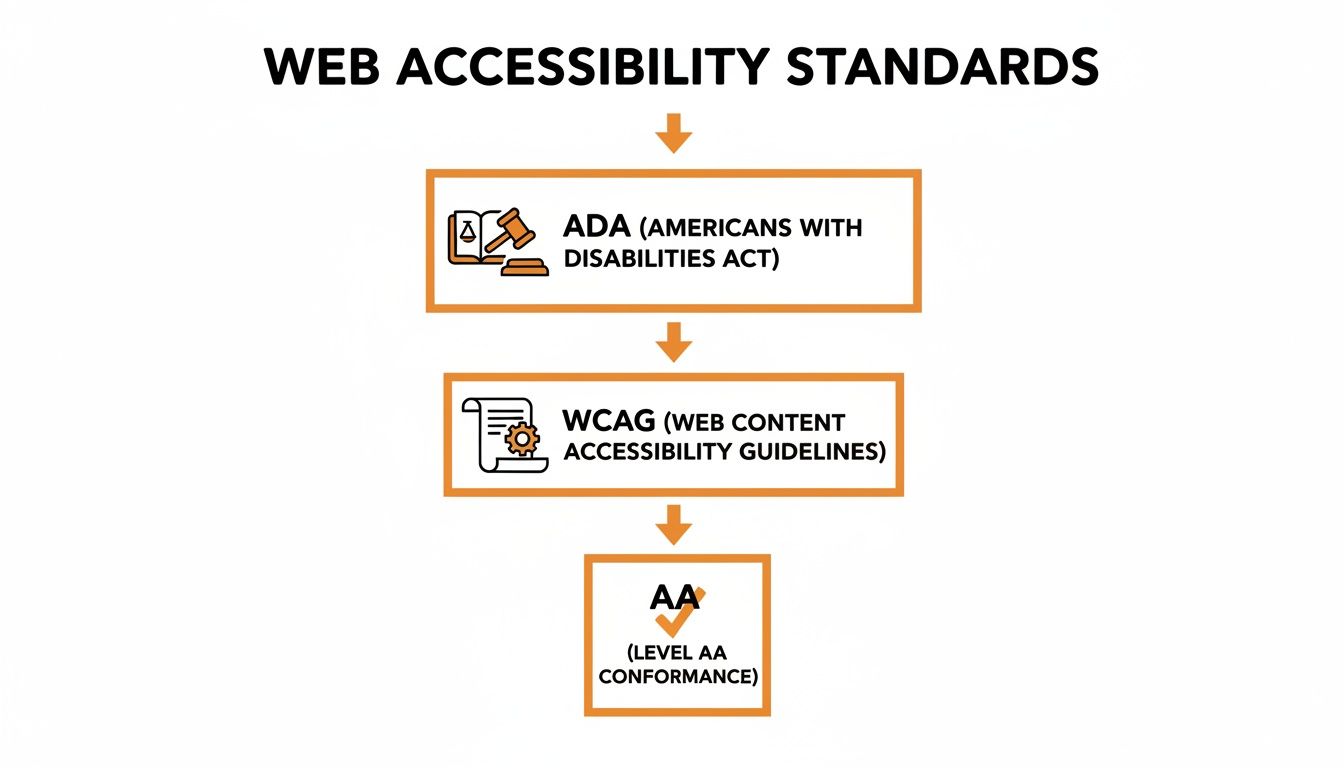
As you can see, it's a clear path: the ADA sets the legal requirement, and WCAG AA provides the specific, technical steps to meet it. Nail this, and you’re on the right track.
Making Visuals Accessible to Everyone
One of the first and most crucial steps is giving your non-text content a text-based alternative. If someone can't see an image or hear an audio clip, they should still get the same information.
Alt Text for Images: Every meaningful image needs a short, descriptive sentence tucked into its HTML code. For a photo of a product, something like, "Red leather handbag with a gold chain strap" is perfect. If an image is just for decoration, leave the alt text empty () so screen readers know to just skip over it.
Transcripts for Audio: Got a podcast or an audio recording? You need to provide a complete text transcript. This is a must for users with hearing impairments.
These aren't just minor tweaks; they're fundamental for anyone using a screen reader to browse the web.
Ensuring Full Keyboard Functionality
Here’s a fact that surprises many business owners: not everyone uses a mouse. Users with motor disabilities, as well as many who are blind, rely entirely on their keyboard to get around a website.
This means every single interactive element—links, buttons, forms, menus—must be reachable and usable with just the Tab key. When a user tabs to an element, it needs a clear visual outline, known as a focus state, so they know exactly where they are on the page.
A simple test: Put your mouse away and try to navigate your own site. Can you get to the shopping cart, fill out the entire checkout form, and complete a purchase using only your keyboard? If you get stuck, you've found a major accessibility roadblock.
Without this, parts of your website are completely walled off from a whole segment of your audience.
The Importance of Structure and Semantics
A well-structured website is an accessible one. Behind the scenes, assistive technologies read your site's HTML code to understand its layout and how the content is organized. Using what's called semantic HTML is key.
A perfect example is using heading tags (H1, H2, H3) correctly. They aren't just for making text look bigger or bolder; they create a logical outline of the page. Your main page title should be an H1, major sections get an H2, and subsections get an H3.
This structure allows screen reader users to skip straight to the section they care about, instead of having to listen to the entire page from the very beginning. As you build out your site, look for guides on accessible patterns for UI elements like image with text overlays to ensure even complex designs meet WCAG standards.
Designing for Clarity and Readability
Your design choices can either create a clear path for users or put up frustrating barriers. Color contrast, text size, and form usability are huge factors in accessibility.
Color Contrast: Text needs to stand out clearly from its background. This is critical for users with low vision or color blindness. The WCAG AA standard calls for a contrast ratio of at least 4.5:1 for normal-sized text.
Video Captions: Any pre-recorded videos on your site must have accurate, synchronized captions. This is non-negotiable for users who are deaf or hard of hearing.
Accessible Forms: Every field in a form needs a clear label that’s programmatically connected to it (think "First Name," "Email Address"). When a user makes a mistake, the error message must be specific and helpful, telling them what went wrong and how to fix it.
These aren't just "nice-to-haves." Getting them right improves the experience for everyone visiting your site, making it cleaner, simpler, and more intuitive to use.
Here’s a quick-reference table to help you keep these key requirements straight.
WCAG AA Compliance Checklist for Your Website
This table breaks down the core concepts into a practical checklist, explaining what each requirement means and why it's so important for creating an inclusive website.
Requirement | What It Means | Why It's Important |
|---|---|---|
Alt Text on Images | Providing a short, text description for every meaningful image on your site. | Allows screen reader users to understand the content and context of visuals they cannot see. |
Keyboard Navigation | All interactive elements (links, buttons, forms) must be fully usable with only a keyboard. | Essential for users with motor disabilities who cannot use a mouse. |
Sufficient Color Contrast | Text must have a contrast ratio of at least 4.5:1 against its background. | Ensures readability for users with low vision or color blindness. |
Captions on Videos | All pre-recorded video content must include synchronized, accurate captions. | Makes video content accessible to users who are deaf or hard of hearing. |
Semantic HTML | Using HTML tags like H1, H2, and P correctly to define the structure of the page. | Creates a logical outline that assistive technologies use to help users navigate content efficiently. |
Accessible Forms | All form fields must have clear labels, and error messages must be specific and helpful. | Prevents confusion and frustration, enabling all users to submit information successfully. |
Following this checklist is your first line of defense. The vast majority of websites—a staggering 96.3%—have at least one WCAG failure. This is fueling a massive spike in legal challenges, with forecasts showing over 5,000 ADA lawsuits in 2025, many targeting e-commerce sites. Getting these basics right isn't just about compliance; it's about good business.
How to Conduct a Meaningful Accessibility Audit

Knowing your website has accessibility issues is one thing, but finding the exact spots where things break down is a completely different challenge. A proper accessibility audit is your roadmap—it shows you the specific roadblocks keeping people from using your site. This isn't just about running a quick scan; it's a deep dive into how your site actually performs for people with disabilities.
For any business in Southern California, whether you're running a boutique in Beverly Hills or a service business in the San Fernando Valley, this process is essential. Finding these barriers is the only way to start meeting ada compliant website requirements.
Starting with Automated Tools
The easiest place to kick things off is with automated tools. Free browser extensions like WAVE or Axe can give any page on your site a quick once-over in just a few seconds. Think of them as your first line of defense, perfect for catching the "low-hanging fruit."
These tools are built to spot clear, code-based errors defined by WCAG standards. They'll instantly flag issues like:
Images missing alt text.
Text with poor color contrast against its background.
Form fields without proper labels.
Empty links or buttons that go nowhere.
Running an automated tool gives you a fast, actionable checklist of simple fixes. But it’s just the first step.
Why Automated Scans Are Not Enough
Here’s the catch: relying only on automated scans gives you a false—and dangerous—sense of security. Study after study shows these tools can only detect about 30% of all potential accessibility issues. They can tell you if an image has alt text, but they have no idea if that text is helpful or just a string of keywords.
An automated tool is like a spell checker. It can find misspelled words, but it can't tell you if your sentences make any sense. Context and user experience are everything, and that’s where manual testing comes in.
This is a critical distinction that businesses from Pasadena to Long Beach need to get right. If you stop after an automated scan, you're leaving most of the problems on the table and your business exposed to legal risk.
The Power of Manual and Human-Led Testing
To find the other 70% of issues, you have to roll up your sleeves and experience your website the way someone using assistive technology would. This manual testing process is non-negotiable for a real audit because it uncovers the contextual problems that machines will always miss.
Two fundamental manual tests are absolutely essential:
Keyboard-Only Navigation: Unplug your mouse. Now, try to get around your entire website using only the Tab, Shift+Tab, Enter, and Spacebar keys. Can you get through the main menu? Can you add something to your cart and complete the entire checkout? If you get trapped anywhere, you’ve found a major barrier.
Screen Reader Testing: Fire up a screen reader like VoiceOver (built into Macs) or NVDA (a free tool for Windows) and listen to your website. Does the reading order make logical sense? Are your links and buttons clearly announced? This test is the only way to know if your site is genuinely understandable for someone who is blind.
A Warning About "Accessibility Overlays"
As you look for solutions, you’ll inevitably come across "overlay" widgets that promise instant ADA compliance with a single line of code. They’re marketed as a quick, cheap fix, but they've been consistently rejected by courts and accessibility experts alike.
Overlays try to slap a fix on top of your site's code instead of addressing the root problems. Even worse, they often clash with a user's own assistive technology, making the experience even more frustrating. Plaintiff's law firms now actively hunt for sites using these widgets, viewing them as an open admission that the site isn't compliant. The only real path to meeting ada compliant website requirements is a proper audit followed by fixing your website's actual code.
Building Your Accessibility Action Plan
Getting an accessibility audit report back can feel a little like drinking from a firehose. A long list of WCAG errors might look like a mountain you’ll never climb, but it’s not. With the right strategy, you can turn that list into a clear, manageable roadmap for building a truly inclusive website.
The secret is to prioritize intelligently. You don’t need to fix every single thing at once. The real goal is to knock down the biggest barriers first, starting with the parts of your site that matter most to your customers.
Prioritizing Your Remediation Efforts
Start by focusing your energy where it will make the most immediate difference. Not all issues—or pages—are created equal. A minor color contrast issue on a blog post from 2018 is a much lower priority than a keyboard trap that prevents someone from actually buying something from you.
To build a smart plan, organize your fixes around two simple factors:
Impact on Users: Tackle the "showstoppers" first. These are the critical bugs that completely block someone from getting something done, like being unable to submit a contact form or navigate your checkout process without a mouse.
Page Traffic and Importance: Zero in on your most critical user journeys. This almost always means your homepage, your main product or service pages, and the entire path from the shopping cart to the payment confirmation page.
If you’re a local business in Torrance or Whittier, fixing the checkout flow on your online store is far more urgent than tweaking an old "About Us" page. When you fix high-impact issues on high-traffic pages, you’re making the biggest positive change for the largest number of people, right from the start.
Document Everything Diligently
As you start chipping away at the list, documentation becomes your best friend. Keeping a detailed log of every fix isn't just good project management; it's how you demonstrate a real, good-faith commitment to accessibility.
Your remediation log is more than a to-do list; it’s tangible evidence of your ongoing efforts to meet ada compliant website requirements. Should you ever face a legal challenge, this documentation can be your strongest defense.
This log should track the what, when, who, and how for every issue: what was identified, when it was fixed, who handled it, and how the fix was tested. This methodical approach shows that accessibility is a serious, ongoing priority for your business.
Establishing an Ongoing Maintenance Plan
Here’s the thing about accessibility: it’s not a one-and-done project you can just check off a list. It’s a practice that needs to be woven into the fabric of your business. Without a maintenance plan, your site’s compliance will slowly unravel as you add new content, features, and products.
A solid maintenance plan should include a few key things:
Regular Training: Get your whole team on the same page. Everyone from content writers to developers needs to understand the basics.
Scheduled Check-ups: Run periodic mini-audits, especially after you launch a new feature or section of your website.
Incorporate into Workflows: Make accessibility a non-negotiable step in your design, development, and content publishing process. If you're looking for ideas, our guide on 10 website accessibility best practices for 2025 is a great place to start.
By making accessibility a continuous effort, you move out of a reactive, stressful cycle of just fixing problems and into a proactive culture of inclusivity. It’s how you ensure your digital doors stay open to everyone.
Partner with Los Angeles Accessibility Experts
Navigating ADA compliant website requirements can feel like trying to solve a puzzle with missing pieces. You don’t have to do it alone. While this guide gives you the foundation, the surest path to getting—and staying—compliant is working with someone who lives and breathes this stuff every day. For businesses here in Los Angeles, a local expert can make all the difference in building a digital presence that’s secure, inclusive, and ready for growth.
Getting this right isn’t just about avoiding legal headaches. It’s a genuine business advantage. A fully accessible website strengthens your SEO, creates a better experience for every single visitor, and opens your doors to a much wider audience. These aren’t just line items on a checklist; they're real assets in a crowded market.
Your Local Southern California Accessibility Team
Los Angeles is at the center of our service area, and we proudly support clients across a wide network of surrounding cities and neighborhoods throughout Southern California. Our reach includes every corner of L.A.—from Downtown Los Angeles, Hollywood, West Hollywood, Beverly Hills, and Santa Monica to the beach communities of Malibu, Venice, Marina del Rey, Hermosa Beach, Manhattan Beach, and Redondo Beach. We also extend service through the San Fernando Valley, including Sherman Oaks, Studio City, Encino, Van Nuys, North Hollywood, Burbank, Glendale, Pasadena, Woodland Hills, Chatsworth, Canoga Park, Reseda, Northridge, and Tarzana. In the San Gabriel Valley, we work with clients in Alhambra, Monterey Park, San Gabriel, Temple City, Rosemead, Arcadia, El Monte, South El Monte, West Covina, Covina, Baldwin Park, Azusa, Glendora, Duarte, and Monrovia. Farther southeast, we serve Whittier, Pico Rivera, Downey, Norwalk, La Mirada, La Habra, and Cerritos. We also support the South Bay—including Torrance, Carson, Gardena, Hawthorne, Inglewood, and Long Beach—as well as the Gateway Cities and communities throughout the I-10, I-5, 101, and 405 corridors. Whether you’re in a major metro area or a smaller surrounding neighborhood, our team delivers reliable, high-quality service anywhere in or around Los Angeles.
We specialize in making the web’s most popular platforms work for everyone. Our team has deep, hands-on experience with:
WordPress: We go beyond surface-level fixes, implementing accessibility from the code up to ensure your themes and plugins meet WCAG AA standards.
Webflow & Wix Studio: We build websites on these powerful platforms that are both visually stunning and functionally accessible, making sure no user gets left behind.
From detailed audits and practical remediation plans to ongoing support, we’re here to protect and elevate your business.
If you're ready to make your website accessible to everyone and lock in your digital future, our team is ready to help. Contact us today at (650) 260-4067 for a professional consultation.
Frequently Asked Questions About ADA Compliance
Diving into ADA compliance can feel overwhelming, and it's natural to have questions. Here are some of the most common ones we hear from business owners, with straightforward answers to help you get clear on what’s required.
How Much Does It Cost to Make a Website ADA Compliant?
This is the big question, and the honest answer is: it depends. The cost really hinges on your site's size, its complexity, and how many accessibility issues are currently lurking under the hood. A simple informational site might just need a few minor tweaks, whereas a large e-commerce platform could require a significant overhaul.
But here’s the most important way to look at it: investing in accessibility now is far less expensive than getting hit with a lawsuit. When you factor in legal fees and the cost of emergency fixes, being proactive is just smart business.
Can I Just Use an Accessibility Plugin or Widget?
This is a tempting shortcut, but it's a risky one. Those overlay widgets that promise instant, one-click compliance almost never work as advertised because they can't fix deep, code-level problems. Think of it like putting a fresh coat of paint on a wall with a cracked foundation—it might look better for a moment, but the real issue is still there.
Courts have repeatedly decided that these overlay widgets are not a legitimate solution for ADA compliance. Relying on them gives you a false sense of security while leaving your business wide open to legal action.
The only reliable path to genuine compliance is a thorough approach that combines an expert manual review with automated scanning tools.
Does My Small Business Really Need to Be ADA Compliant?
Yes, absolutely. The ADA's rules apply to all "public accommodations," and courts have consistently ruled that this includes commercial websites—no matter how big or small the business is. In fact, small businesses are often the primary targets of accessibility lawsuits.
There's no exemption for being a small or local business. Compliance isn't just a "big corporation" problem; it's a legal must for any company that serves the public online. It’s about making sure every potential customer can access what you have to offer.
At DLL Studios, we make the compliance process clear and straightforward, providing expert guidance to protect your business. We offer comprehensive audits and remediation services tailored for businesses across Southern California. Learn more at https://www.dllstudios.com.

