


.png)
Best Ecommerce Platforms for Small Business Success
For most small businesses just starting out, the best all-around choice is usually Shopify. It’s incredibly straightforward and can grow with you. But if you’re more of a hands-on type with some tech skills, WooCommerce offers freedom you just can’t beat. And for absolute beginners, Wix is probably the easiest way to get a store online. The right answer really comes down to what you’re comfortable with and where you see your business heading.
Choosing Your Ecommerce Foundation
Picking an ecommerce platform isn’t just a technical choice—it’s arguably the most critical strategic decision you'll make for your online business. This is the foundation that dictates how you’ll handle everything from inventory and payments to marketing and customer service.
Think of it like picking the perfect spot for a brick-and-mortar shop. It affects foot traffic, customer experience, and your ability to scale. Your platform is your digital headquarters.
Just like a local Los Angeles business needs the right storefront to pull in shoppers from Beverly Hills or Santa Monica, your online store needs a solid base to attract visitors and make sales. This isn't just software; it's your operational core.

Understanding the Top Contenders
If you're a startup or a small retailer who needs to get online fast without any technical headaches, a solution like Shopify is tough to beat. It manages all the behind-the-scenes work, so you can focus on what you do best: selling. It’s no surprise it powers a huge number of online stores worldwide.
On the flip side, if you have a very specific vision and want total creative control, something more flexible like WooCommerce might be a better fit. It gives you the power to build a truly unique brand experience, whether you're targeting customers in the San Fernando Valley or the San Gabriel Valley. The catch? You need the technical know-how to make it all happen.
Your ecommerce platform should work for your business, not the other way around. The best choice aligns with your technical comfort level, budget, and vision for future growth.
Before we get into the nitty-gritty, it helps to see how the big names compare at a glance. For some extra context, this expert guide on the best ecommerce platforms for small business is a great starting point.
Ecommerce Platform At-a-Glance Comparison
Here’s a quick rundown of the top three platforms. This table highlights their strengths and who they’re really built for, helping you narrow down your options from the get-go.
Platform | Best For | Key Differentiator | Technical Skill Required |
|---|---|---|---|
Shopify | Most small businesses, startups, and retailers | All-in-one simplicity and a massive app ecosystem | Low |
WooCommerce | Businesses wanting full control and customization | Open-source flexibility built on WordPress | Medium to High |
Wix | Beginners, service providers, and artists | Easiest drag-and-drop website builder | Very Low |
After looking at the table, it’s easier to see why each platform has its loyal fans.
The market data backs this up. Shopify has consistently held a commanding lead, capturing around 29-30% of the U.S. market share as we head into 2025. Its popularity is a testament to its reliability for businesses that need to get online quickly without writing a single line of code.
Los Angeles is at the center of our service area, and we proudly support clients across a wide network of surrounding cities and neighborhoods throughout Southern California. Our reach includes every corner of L.A.—from Downtown Los Angeles, Hollywood, West Hollywood, Beverly Hills, and Santa Monica to the beach communities of Malibu, Venice, Marina del Rey, Hermosa Beach, Manhattan Beach, and Redondo Beach. We also extend service through the San Fernando Valley, including Sherman Oaks, Studio City, Encino, Van Nuys, North Hollywood, Burbank, Glendale, Pasadena, Woodland Hills, Chatsworth, Canoga Park, Reseda, Northridge, and Tarzana. In the San Gabriel Valley, we work with clients in Alhambra, Monterey Park, San Gabriel, Temple City, Rosemead, Arcadia, El Monte, South El Monte, West Covina, Covina, Baldwin Park, Azusa, Glendora, Duarte, and Monrovia. Farther southeast, we serve Whittier, Pico Rivera, Downey, Norwalk, La Mirada, La Habra, and Cerritos. We also support the South Bay—including Torrance, Carson, Gardena, Hawthorne, Inglewood, and Long Beach—as well as the Gateway Cities and communities throughout the I-10, I-5, 101, and 405 corridors. Whether you’re in a major metro area or a smaller surrounding neighborhood, our team delivers reliable, high-quality service anywhere in or around Los Angeles.
Comparing Core Ecommerce Features
Choosing the right ecommerce platform is less about the flashy sales pitch and more about the core features that will define your day-to-day. How simple is it to add a new product? Can you make the storefront truly yours? And will it keep up when your business starts to take off?
We're going to dive into three critical areas: Ease of Use, Customization, and Scalability. By putting Shopify, WooCommerce, and Wix head-to-head on these practical fronts, you’ll get a real feel for what it’s like to actually run your business on each one. This isn't about finding the longest feature list—it's about finding the right tools for your needs.
Ease of Use and Daily Management
For a small business owner, time is your most precious currency. Your platform should simplify your workflow, not add to it. Here, the difference between a hosted solution and an open-source one is night and day.
Shopify is famous for its clean, intuitive dashboard. Everything from adding products to fulfilling orders is designed for someone who isn't a tech wizard. The guided setup process walks you through the launch, making it incredibly easy to get started.
Wix pushes that simplicity even further with its drag-and-drop editor. If you’ve ever made a PowerPoint presentation, you can build a Wix store. This makes it a fantastic starting point for businesses needing to get online fast with zero fuss, like local restaurants or service providers in places like Pasadena or Glendale.
WooCommerce, on the other hand, lives inside WordPress, which brings a steeper learning curve. It’s incredibly powerful, but it puts you in the driver’s seat for managing hosting, security, and plugin updates. This hands-on approach gives you ultimate control but demands more technical know-how for daily tasks.
Platform Customization and Design Freedom
Your online store is your brand’s digital home; it needs to look and feel like you. How much customization you need is a classic trade-off between simplicity and total control.
Wix has hundreds of professionally designed templates that are a breeze to modify. But that ease comes with guardrails—you’re working within the boundaries of the template and the Wix editor. For most businesses wanting a clean, professional look without needing to reinvent the wheel, this is more than enough.
Shopify hits a nice middle ground. It offers a huge selection of polished, mobile-ready themes (both free and paid). You can tweak colors, fonts, and layouts without seeing a single line of code. For deeper changes, you’ll need to edit the theme’s Liquid files or bring in a developer. Its curated App Store also lets you add new functions without breaking anything.
WooCommerce is the undisputed champion of total customization. As an open-source plugin, you have the freedom to build literally any design or feature you can dream up. The catch? That freedom comes with responsibility. You'll need the technical chops—or a development partner—to make it happen.
A boutique in Beverly Hills wanting a one-of-a-kind, brand-heavy shopping experience would probably lean toward WooCommerce. In contrast, a new startup in Studio City could get a beautiful, high-performing store live on Shopify in a fraction of the time.
Scalability and Growing Your Business
A platform that’s perfect today needs to support you tomorrow. Scalability isn’t just about handling more traffic—it’s about unlocking advanced features as your business gets more complex. All three platforms can grow with you, just in different ways.
Wix is a great place to start and can easily support many small to medium-sized businesses. Its tiered plans unlock more products and features as you grow, and its solid performance and built-in marketing tools make it a strong contender for businesses focused on local markets.
Shopify was practically built to scale. From its basic plan all the way up to Shopify Plus, there’s a clear path for growth that supports businesses from their first sale to millions in revenue. With its rock-solid hosting, secure checkout, and massive app ecosystem, you can add capabilities like advanced inventory management or international shipping without ever touching the backend.
WooCommerce has theoretically limitless scalability, but it all comes down to your hosting and technical expertise. To handle a traffic surge, you need a powerful hosting plan and someone who knows how to optimize it. This makes it a beast for businesses that have the resources to manage their own technical infrastructure.
Here’s a more detailed breakdown of how their features stack up against each other.
In-Depth Feature Showdown
This table provides a direct, feature-by-feature comparison across the most critical functions for a small business.
Feature | Shopify | WooCommerce | Wix |
|---|---|---|---|
Setup & Onboarding | Guided, step-by-step setup. Very beginner-friendly. | Requires WordPress install, hosting setup, and manual configuration. | Drag-and-drop editor with AI-assisted setup options. Easiest to start. |
Inventory Management | Built-in with stock tracking, variants, and locations. Advanced via apps. | Core features included. Highly extendable with free & paid plugins. | Integrated system for physical/digital products. Good for small catalogs. |
Payment Gateways | Shopify Payments (no transaction fees) + 100+ third-party gateways. | Supports all major gateways (Stripe, PayPal) plus many others via extensions. | Wix Payments + 50+ other options including PayPal and Stripe. |
Shipping Options | Discounted rates with major carriers (USPS, UPS, DHL). App integrations. | Highly flexible with extensions for table rates, live rates, and local pickup. | Built-in tools for flat rates, weight-based, and real-time carrier rates. |
SEO Capabilities | Strong, with editable meta tags, URLs, and auto-generated sitemaps. | Excellent. Full control via WordPress plugins like Yoast SEO. | Good built-in SEO tools (Wix SEO Wiz) for beginners and intermediates. |
Marketing & Promotions | Built-in discount codes, gift cards, and email marketing. Extensive apps. | Powerful coupon system. Integrates with countless marketing plugins. | Integrated email marketing, social posts, and basic automation tools. |
Blogging Platform | Included, but basic compared to dedicated platforms. | The best. Built on WordPress, the gold standard for blogging. | Good, user-friendly blogging functionality built directly into the site. |
Point of Sale (POS) | Excellent, fully integrated hardware and software (Shopify POS). | Possible through third-party plugins, but not as seamless. | Offers a capable POS solution for syncing online and in-person sales. |
Customer Support | 24/7 support via phone, email, and live chat. | Community forums, documentation. Paid support from hosting/developers. | 24/7 customer care, priority support for higher-tier plans. |
While each platform has its strengths, the choice often comes down to how much control you want versus how much you want handled for you.
The Power of App and Plugin Ecosystems
No platform does everything right out of the box. That’s where app marketplaces and plugin ecosystems come in, letting you bolt on new functionality as you need it.
Shopify's App Store: This is a curated marketplace. Every app has to meet Shopify’s standards for quality and security. This "walled garden" approach ensures reliability, but the apps often come with monthly fees that can add up.
WooCommerce's Plugin Repository: With over 50,000 plugins, the WordPress and WooCommerce ecosystem is massive. You can find free or one-time purchase options for almost anything, but you’re responsible for checking their quality, security, and compatibility.
Wix App Market: Like Shopify, Wix provides a curated market of apps for adding features like booking systems, loyalty programs, or advanced contact forms. It’s a safe and easy way to extend your store’s capabilities without the technical risk.
For a deep dive into optimizing the final—and most critical—step of your customer's journey, check out our guide on 10 ecommerce checkout best practices for 2026 to boost conversions.
The simplicity offered by platforms like Wix has earned it a huge slice of the market. Wix Stores now holds a 20-23% market share, powering millions of sites for small businesses that love its intuitive interface and all-in-one marketing tools. This is especially important as mobile commerce is expected to hit $2.51 trillion in 2025. For the clients we serve at DLL Studios—from dental practices in Encino to restaurants in Downey—Wix helps us deliver modern, responsive sites quickly, with critical features like ADA compliance and local SEO already baked in. You can explore more on this trend by reviewing the U.S. ecommerce platforms market share data on Statista.
Putting Platforms to the Test: Real-World Scenarios
Feature lists and spec sheets are one thing, but the real test is how a platform actually performs when you’re in the trenches, running your business day-to-day. The "best" choice really depends on your specific model, your goals, and how you operate. So, let's stop talking theory and drop our top contenders into some practical, everyday business situations.
This approach helps you really picture how each platform would fit into your own workflow. When you see how they solve tangible problems for different kinds of businesses, it becomes much clearer which one truly lines up with your vision.
To get you started, this decision tree is a great visual guide. It breaks down the choice based on what you need most, whether that's a simple launch, total creative control, or an all-in-one system.
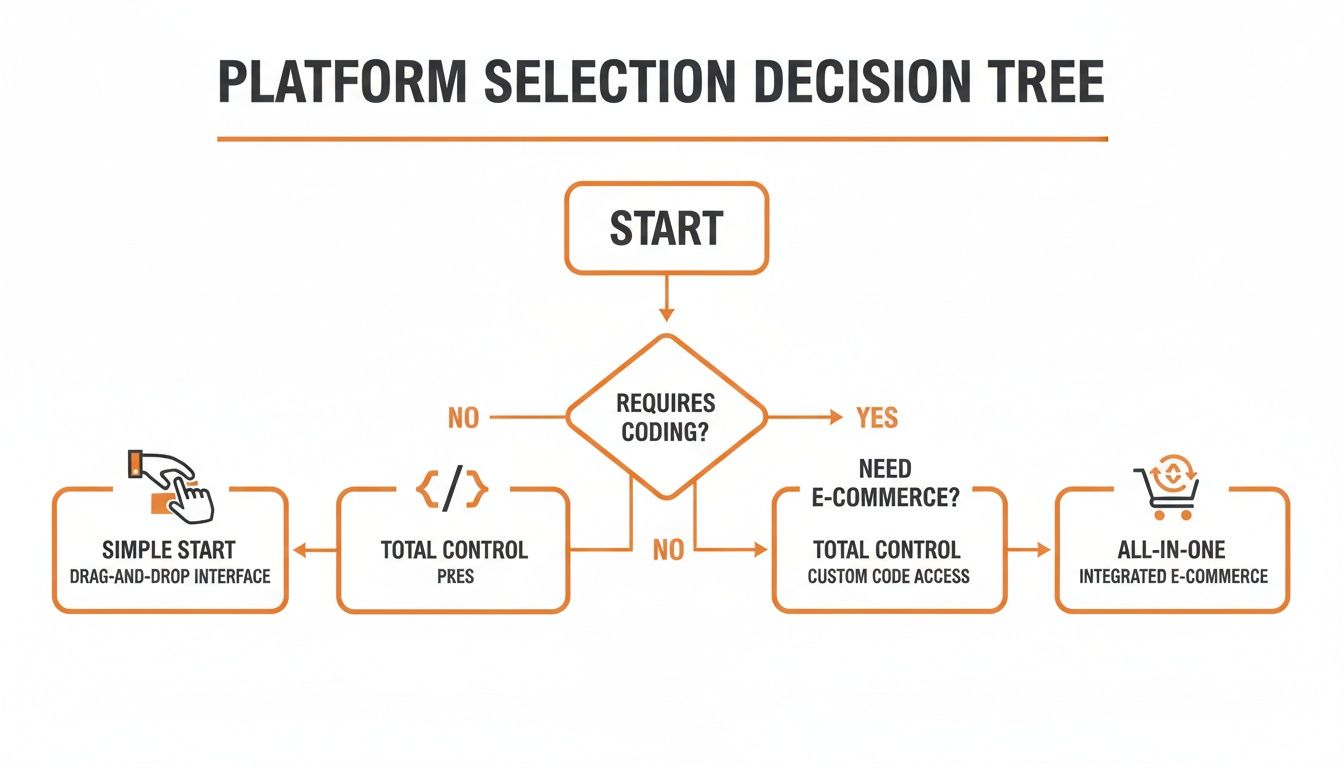
The flowchart cuts through the noise by connecting your core business needs—like ease of use versus complete customization—to the platform that handles it best.
The Local Boutique Retailer
Picture a chic boutique in a busy spot like Santa Monica or a quaint shop in Pasadena. They sell unique clothing both from their physical storefront and online. Their biggest challenge? Making sure their digital and in-store inventory are perfectly synced to avoid the nightmare of overselling a popular item.
For this business, Shopify is the hands-down winner.
Shopify’s Point of Sale (POS) system is built to integrate flawlessly with its online store. When a customer walks in and buys a dress, the online stock count updates instantly—and vice versa. For a retailer juggling foot traffic and web orders, this unified inventory management is a lifesaver.
Having one dashboard to manage both online and in-person sales saves countless hours and prevents expensive inventory mistakes. For a small retail team, that kind of streamlined system is priceless.
On top of that, Shopify’s built-in tools for local pickup and delivery are perfect for serving customers in nearby neighborhoods, from Beverly Hills to the beach communities of Malibu and Venice.
The Custom T-Shirt Artist
Now, let's think about an artist in the San Fernando Valley—maybe Studio City or Sherman Oaks—who sells custom-printed t-shirts. Every design might come in 10 sizes, 15 colors, and with multiple options for print placement. That adds up to a dizzying number of product variations that need to be managed without causing a headache.
In this scenario, WooCommerce is the champion.
Because it's built on WordPress, its open-source framework gives you unmatched flexibility. The artist can tap into powerful plugins designed specifically to handle complex product variations, set up conditional shipping rules (like extra fees for oversized items), and even let customers upload their own artwork.
That level of granular control just isn't something you can get out of the box with simpler, all-in-one platforms. It definitely requires more of a technical setup, but the freedom to build a completely bespoke ordering process is a must-have for any business centered on highly customizable products. If you want to see a deeper analysis of how these platforms compare, check out our breakdown of Wix Studio vs WordPress vs Shopify.
The Service Provider Selling Digital Courses
Finally, imagine a consultant based in Downtown Los Angeles. They sell digital courses and offer one-on-one coaching sessions. Their main concern isn't shipping physical goods; it's managing memberships, scheduling appointments, and delivering protected digital content.
For this business model, Wix is the ideal solution.
Wix shines as an all-in-one platform for service-based businesses. It comes with strong, native features for handling bookings (Wix Bookings), managing memberships (Wix Member Areas), and selling digital products right out of the gate.
The consultant can build a polished website, sell access to video courses, and let clients book coaching calls directly through the site—all without juggling a messy web of third-party apps. This integrated approach simplifies the entire tech stack and creates a smooth, professional experience for clients from West Hollywood to the South Bay. While other platforms can pull this off with add-ons, Wix bakes these critical functions right into its ecosystem, making it a refreshingly streamlined choice for service providers.
Analyzing the True Cost of Your Online Store
The sticker price on an ecommerce platform is just the tip of the iceberg. I’ve seen it time and time again: a small business signs up for an attractive monthly fee, only to find their final bill is double or even triple what they expected. To pick the right platform, you have to look at the total cost of ownership.
Those hidden expenses—from transaction fees and essential apps to hosting and potential developer help—can quickly turn a seemingly affordable option into a financial headache. You need to budget for the real cost, not just the advertised one.
Before you commit, it’s worth taking a moment for a deeper understanding platform pricing and the different ways platforms structure their fees. A little homework now will save you a lot of surprises later.

Beyond the Monthly Subscription
Often, the biggest cost differences aren't in the subscription plan itself, but in what’s not included. Every platform approaches these "extras" differently, and your choice will put you on a distinct financial path.
A perfect example is web hosting. With hosted platforms like Shopify and Wix, secure, high-performance hosting is baked right into your subscription. This is a huge plus, as it simplifies your budget and takes the technical work of server management off your plate. For businesses in competitive markets like Hollywood or West Hollywood, this reliability is non-negotiable.
On the other hand, WooCommerce is a free plugin, but you’re on the hook for your own hosting. While this gives you more control, the costs can range from $10 per month for a basic shared plan to over $100 per month for a managed solution that can handle serious traffic from across the San Fernando Valley.
Decoding Transaction and App Fees
Transaction fees are another area where your costs can creep up. Every single sale you make comes with a payment processing fee, which usually hovers around 2.9% + 30¢. The catch is that some platforms stack their own fees right on top.
Shopify: Use their native Shopify Payments, and you're golden—no extra platform fees. But if you connect a third-party gateway like PayPal, Shopify will charge you an additional fee of up to 2% on every transaction.
WooCommerce: It doesn't charge its own transaction fees. Your only cost is the standard rate from your payment processor, whether that’s Stripe or PayPal.
Wix: Much like Shopify, Wix encourages using its native Wix Payments to help you sidestep any extra platform fees, making it a solid choice for keeping costs down.
The cost of apps and plugins can be one of the biggest hidden expenses. A feature that's built-in on one platform might require a $20/month subscription on another. Carefully audit the functionalities you need and research their costs.
Sample Cost Breakdowns by Business Stage
To give you a real-world picture of how these costs add up, let’s map out a few scenarios for businesses operating around Los Angeles.
1. The Startup (e.g., a new shop in Alhambra)
Platform: Shopify Basic ($29/month)
Essential Apps: Email marketing, product reviews ($30/month)
Transaction Fees: 2.9% + 30¢ (via Shopify Payments)
Estimated Monthly Total: $59 + processing fees
2. The Growing Business (e.g., a retailer in Torrance)
Platform: WooCommerce on managed hosting ($50/month)
Premium Plugins: Advanced shipping, subscriptions ($200/year, or ~$17/month)
Transaction Fees: 2.9% + 30¢ (via Stripe)
Estimated Monthly Total: $67 + processing fees
3. The Established Small Business (e.g., a brand in Beverly Hills)
Platform: Shopify Plan ($79/month)
Advanced Apps: Loyalty program, advanced analytics, customer service ($150/month)
Transaction Fees: 2.6% + 30¢ (lower rate on this plan)
Estimated Monthly Total: $229 + processing fees
Thinking through your budget this way ensures you pick a platform that will actually support your growth instead of becoming a financial burden. It’s all about finding a solution that is not just powerful, but truly sustainable for your business.
How Each Platform Impacts Your SEO Performance
Your ecommerce platform is the technical foundation for all your SEO efforts. A slow, clunky, or mobile-unfriendly site can kill even the sharpest marketing campaign before it starts. Picking the right platform means finding one that gives you the tools to rank well and pull in organic traffic.
This isn't just a nerdy detail; it's a core part of your business strategy. Strong SEO means customers in competitive markets like Los Angeles—from Hollywood all the way to the San Gabriel Valley—can find you without you paying for every single click. Let's dig into how Shopify, WooCommerce, and Wix handle the nuts and bolts of what gets you seen on Google.
Site Speed and Mobile Responsiveness
Site speed is a confirmed Google ranking factor, and with over half of all web traffic coming from mobile devices, a responsive design is non-negotiable. A slow-loading site will send potential customers in places like Long Beach or Pasadena clicking away before your page even finishes loading.
Shopify and Wix are hosted platforms, which means they handle all the server-side heavy lifting for you. They pour money into high-performance infrastructure to make sure their stores load fast and look great on any device, automatically. It’s a hands-off approach that gives you a solid performance baseline without needing any technical know-how.
WooCommerce, on the other hand, is self-hosted, which puts performance squarely on your shoulders. While this gives you incredible control, it also means your site's speed is completely dependent on your hosting provider and your optimization skills. A cheap hosting plan can absolutely torpedo your SEO, but with the right setup, a WooCommerce site can be a speed demon.
Core SEO Tools and URL Structures
The power to control on-page SEO elements like titles, meta descriptions, and URL structures is fundamental. All three platforms give you the basics, but they really differ in how much control and flexibility you get.
Shopify: Comes with strong, built-in SEO tools. You can easily edit meta tags and alt text for images. Its one minor quirk is a somewhat rigid URL structure that adds prefixes like or . You can't remove them, which can be a small annoyance for SEO perfectionists.
Wix: Provides a solid suite of built-in SEO features, including the Wix SEO Wiz, which is great for guiding beginners through the optimization process. It allows for clean URL customization, giving you a good foundation to build on.
WooCommerce: Paired with a plugin like Yoast SEO, it offers unmatched SEO control. You have total authority over every single aspect of your on-page and technical SEO, from creating custom URL structures to implementing advanced schema markup.
For businesses that need granular control over every last SEO detail, WooCommerce is the undisputed winner. But for most small businesses, the built-in tools from Shopify and Wix are more than enough to achieve strong search rankings.
Structured Data and Accessibility
Structured data, often called schema markup, is what helps search engines understand your product information—like price, availability, and reviews—and display it as eye-catching rich snippets in search results. This can give your click-through rates a serious boost. Both Shopify and Wix automatically add basic product schema, while WooCommerce lets you get far more advanced with customization through plugins.
Just as important is accessibility (ADA compliance), which ensures your site is usable by people with disabilities. This not only opens up your store to a wider audience but is also becoming a more significant signal for search engines. An agency like DLL Studios specializes in building ADA-compliant sites, ensuring every customer, whether they're in Beverly Hills or Downey, has a positive experience.
For more insights on driving organic traffic, check out our guide on the top 10 ecommerce SEO best practices.
When to Hire an Ecommerce Agency
Picking the right ecommerce platform is a massive win, but let's be honest—it’s just the starting line. Getting an online store off the ground and actually making it grow takes real expertise in design, development, SEO, and marketing. These are skills that go way beyond what any platform's built-in tools can offer.
While you can definitely handle the basics yourself, there are moments when bringing in a professional agency shifts from being a cost to a strategic investment. This is especially true if you’re trying to stand out in a crowded market like Los Angeles, where an agency can help you sidestep the common pitfalls that slow down growth or lead to expensive mistakes.
Knowing When It's Time to Call for Backup
The trick is recognizing when you’ve pushed your own expertise to its limit. Certain challenges are clear signals that it’s time to hand the reins over to a team of specialists.
If any of these sound familiar, it’s probably time to get some professional help:
Complex Data Migrations: Moving thousands of products, customer profiles, and years of order history from an old system to a new one is a minefield. An agency ensures nothing gets lost or broken in the process.
Custom API Integrations: Need your store to talk to a third-party inventory system, a niche shipping provider, or a specialized CRM? That requires custom-built, seamless integrations.
Achieving Full ADA Compliance: Making sure your website is accessible to every user isn’t just good for business—it’s a legal requirement. Experts can audit your site and fix it to meet WCAG standards.
Launching Multi-Channel Marketing: Juggling a sophisticated campaign across SEO, PPC, and email requires a unified strategy and constant tweaking to see a positive ROI.
An experienced agency doesn’t just build you a website; they build you a growth engine. Their job is to hit the accelerator on your success by handling the technical headaches, freeing you up to actually run your business.
For businesses all over Southern California—from the San Fernando Valley down to the South Bay—partnering with a local agency like DLL Studios gives you a serious competitive advantage. Our team brings deep, specialized knowledge in design, development, and digital marketing to every project we touch. We don't just help businesses launch; we help them thrive.
Ready to take your online brand to the next level and see real, measurable results? Give DLL Studios a call today at (650) 260-4067 to talk about how we can help you win.
Frequently Asked Questions
Jumping into the world of ecommerce always stirs up a lot of questions. We get it. Here are some clear, straightforward answers to the things small business owners ask us most when they're hunting for the right platform.
Which Ecommerce Platform Is Easiest for a Complete Beginner?
If you're just starting out online, Wix and Shopify are consistently the best places to begin.
The biggest win here is their user-friendly design. Both platforms have slick drag-and-drop website builders, which means you can put together a professional-looking store without touching a single line of code. They also handle all the hosting, security, and server stuff behind the scenes, so you can skip the technical headaches and focus on what matters: listing your products and making that first sale.
How Important Are Payment Gateway Options?
They’re absolutely critical if you want to maximize sales. Think about it—today’s customers expect to pay their way, whether that’s with a credit card, PayPal, or a digital wallet like Apple Pay.
Limiting how your customers can pay is a surefire way to increase cart abandonment. The more familiar options you offer, the smoother the checkout, which builds trust and gets more people to click "buy."
Each platform approaches this a bit differently. Shopify and Wix both have their own native payment systems (Shopify Payments and Wix Payments) and encourage you to use them to avoid extra transaction fees. That said, they still integrate with dozens of other popular gateways. WooCommerce, on the other hand, gives you the most freedom, letting you connect to almost any payment processor you can think of—but you'll have to do the setup yourself.
Can I Switch Ecommerce Platforms Later?
Yes, you can definitely move to a new platform as your business grows, but it’s a big project that needs serious planning. This process, called a platform migration, involves transferring all your product data, customer lists, and order history from one system to another.
While it's totally possible, it can be a technical minefield and take a lot of time. To avoid losing precious data or tanking your SEO, it’s always best to pick a platform from the start that can grow with you. If you do find yourself needing to make a switch, bringing in an agency is often the smartest move to ensure everything goes smoothly without disrupting your business.
Ready to build a high-performing ecommerce store that drives results? DLL Studios offers expert web design and digital marketing services to help your business thrive online. Contact us today for a consultation
