


.png)
Wix Support Line: Quick Steps to Contact Wix Help
It can feel a little strange when you're looking for a Wix support line and realize there isn't a direct phone number you can just dial up. That's actually by design. Instead of leaving you on hold, Wix built a callback system to get you to the right person without the wait.
Getting your head around this process is the first, and most important, step to getting the help you need.

Why Doesn't Wix Just Have a Phone Number?
Let's be honest, nobody likes being stuck in a support queue. With over 258 million users around the world, a traditional call center would be a nightmare. Wix's approach is designed to be smarter and more efficient.
Instead of making you wait, their system logs your issue and connects you with an expert who's already been briefed on your specific problem. It’s essentially a triage system for your website. Simpler questions get filtered toward Help Center articles for instant answers, while the more complex stuff gets escalated to a real person.
The Upside of the Callback System
It might feel a bit indirect at first, but this method has some real advantages. You're not just getting the next available agent; you're getting the right one. Whether you're wrestling with the Wix Editor, have a billing question, or a third-party app is acting up, the system routes you to a specialist.
This approach allows Wix to:
Handle Urgent Issues First: If your site is down, your ticket gets flagged and pushed to the front of the line.
Connect You with the Right Expert: Your request goes straight to the team that specializes in your exact problem.
Get a Head Start: By having you describe the issue upfront, the support agent can start looking into it before they even call you.
The whole point of guiding you through the Help Center first is to empower you with immediate answers for common problems. This keeps the callback queue clear for issues that genuinely need one-on-one attention.
At the end of the day, the model is built for efficiency at a massive scale. It respects your time by letting the support agent prepare, which turns what could have been a long, frustrating phone call into a focused and productive conversation. Knowing why they do it this way is the key to making it work for you.
How To Navigate The Wix Callback System
Getting a Wix expert on the phone isn't a matter of finding a secret number; it’s about knowing how to work their callback system. This process is designed to filter your issue and connect you with the right specialist, so a little strategy goes a long way. The whole journey starts right inside your Wix account.
First things first, log into your Wix Dashboard and make your way to the Wix Help Center. This is your command center. Instead of just browsing, use the search bar to type a phrase that nails down your problem. This step is crucial because the system will first try to solve your issue with relevant articles.
Getting The Callback Option To Appear
Once you've searched for your issue and clicked on the article Wix suggests, scroll all the way to the bottom. You’ll see a simple question: "Did this solve your problem?" Clicking "No" is the key that unlocks the next step and guides you toward a contact form.
This is where you need to be smart. Frame your issue with enough detail to show you've already tried the basics. A vague message like "my site is broken" will probably just loop you back to another generic article.
A much better request looks something like this: "The 'Add to Cart' button on my product page for the 'Vintage T-Shirt' is unresponsive on Chrome, but it works on Safari. I've already cleared my browser cache and disabled third-party apps, but the issue persists." This shows you’ve done your homework and need a real person to step in.
This screenshot shows the final step where you can choose between submitting a ticket, starting a chat, or requesting a callback if the option is available for your issue and region.
Pro Tips For A Faster Response
To get your request the attention it deserves, think like a support agent. What information would they need to solve this without a dozen back-and-forth emails? Give it to them upfront. This level of detail helps the specialist who calls you back to arrive prepared, which saves everyone’s time.
Here are a few things to keep in mind:
Be Specific: Always mention the exact page, element, or feature that’s giving you trouble.
Select the Right Category: Choose the topic that most closely matches your problem. If you're torn between two, pick the one that feels more critical to your site's core function.
Mention Troubleshooting Steps: Briefly list what you’ve already tried, like clearing your cache or checking your internet connection.
This system is built to handle an incredible volume of requests. We’re talking over 1 million support tickets every single month. With an average resolution time of just 9.6 hours and an AI assistant that handles 22% of issues on its own, they’ve streamlined things to keep the callback queue open for complex problems like yours. You can read more about their support operation in this detailed breakdown.
By providing a clear, detailed request, you’re not fighting the system—you’re helping it work for you.
Knowing how to get a human on the line is a huge win, but jumping into the callback queue isn't always the quickest path to a solution. Wix has a few different support channels, and picking the right one for your specific problem can save you a ton of time and headache. It’s all about matching the urgency and complexity of your issue with the best tool for the job.
Got a quick, simple question? Wix Live Chat is your best bet. If you have a straightforward billing inquiry, can't find a feature in the editor, or are hitting a minor technical snag, live chat gets you real-time answers without waiting for a call. Think of it as the digital version of flagging down a store employee for a quick pointer.
When To Use Chat Versus a Support Ticket
Live chat is perfect for those immediate, low-complexity problems—the kind of thing you can solve in a short, text-based conversation. You get instant feedback and can often have the whole thing wrapped up in minutes.
But for more complex issues that need a real investigation, a detailed support ticket is the way to go. If your site has a recurring bug, a third-party app is acting up, or you need help with a more advanced feature like those in Wix Studio, a ticket gives the support team the space they need to dig in. If you're using the platform, our guide to what Wix Studio is and how it works can give you a deeper look into its capabilities.
Submitting a ticket is better for tricky situations because you can:
Provide the Full Story: Attach screenshots, screen recordings, and a complete play-by-play of the problem. This context is gold for the support team.
Create a Paper Trail: A ticket ensures your issue is officially logged, tracked, and escalated if necessary.
Allow for a Deep Dive: The support team can comb through logs and test solutions on their end without you having to stay on the line.
Choosing the right channel is all about efficiency. Trying to solve a deep technical bug over live chat will just lead to frustration, and waiting on a callback for a simple billing question is an unnecessary delay.
Wix Support Channels Compared
To help you decide at a glance, here’s a quick comparison of the main ways to get help from Wix.
Support Channel | Best For | Average Response Time | Pros | Cons |
|---|---|---|---|---|
Callback Phone Support | Complex, urgent issues needing direct conversation. | 2-5 minutes (queue) | Direct access to an expert, real-time troubleshooting, ideal for nuanced problems. | Limited to business hours, requires navigating the Help Center to request. |
Live Chat | Quick questions, simple troubleshooting, billing inquiries. | Under 2 minutes | Instant answers, great for multitasking, fast resolution for minor issues. | Not ideal for complex problems, text-only communication can be limiting. |
Support Tickets | Non-urgent, detailed technical problems, bugs, third-party app issues. | 24 hours (usually) | Allows for detailed explanations with attachments, creates a formal record, gives team time to investigate. | Slower response time, not suitable for urgent "site down" situations. |
Help Center | DIY troubleshooting, learning how to use features, general information. | Instant | Comprehensive articles and tutorials, available 24/7, empowers you to solve problems yourself. | Can be overwhelming to navigate, may not cover very specific or unique issues. |
Ultimately, knowing your options ahead of time means you can get the right kind of help, right when you need it, without wasting a moment.
For those more complex issues where talking it through is a must, the callback system is straightforward. This visual breaks down the simple three-step process to get in the queue.
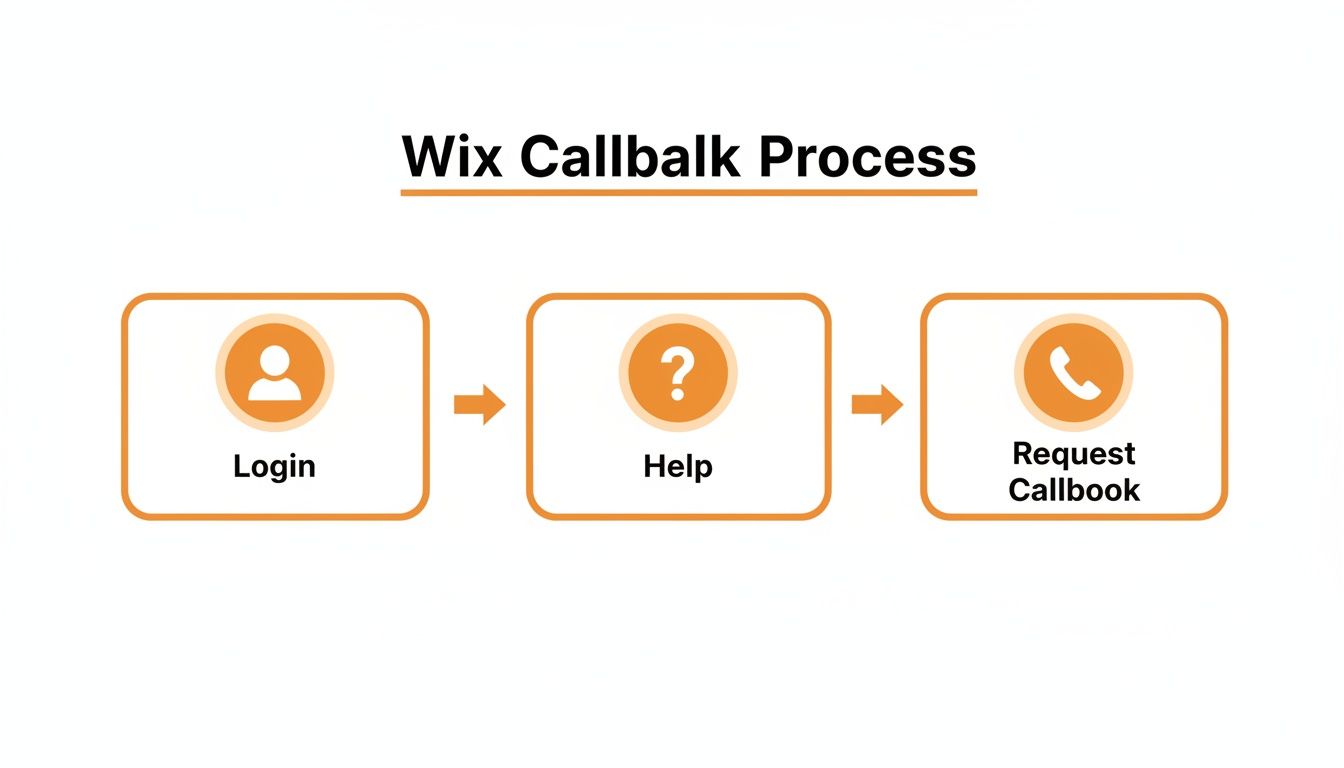
This process ensures that when an agent calls you, they already have the context needed for a productive conversation. This efficiency is a big reason why Wix holds a 4.6 average rating from over 14,500 reviews and manages to resolve issues with a 9.6-hour average fix time, even while handling over a million requests a month.
How To Prepare For Your Call With Wix Support
Getting that callback from the Wix support line feels like a win, but the real victory is having a productive conversation that actually solves your problem. Trust me, a few minutes of prep can turn a potentially painful, long-winded call into a five-minute fix. One of the biggest mistakes people make is jumping on the call cold, which almost always guarantees it will take longer than it needs to.
The support agent on the other end is there to help, but they aren't a mind reader. Your job is to give them all the clues they need to solve the puzzle as fast as possible. Before they ring, just take a moment to get your ducks in a row.

Your Pre-Call Checklist
To really make the most of your support call, have these details ready to go. This isn't complicated stuff, but having it right at your fingertips will make the agent's job—and your life—so much easier.
Account & Site Details: Know the email address tied to your Wix account and the name of the specific site you’re calling about. This is especially critical if you manage multiple websites for clients or your own projects.
Pinpoint the Problem Area: Be ready to tell them exactly where the issue is. Have the specific page name handy (e.g., "the About Us page") and which element is acting up (e.g., "the photo gallery at the bottom" or "the contact form").
Visual Evidence: This one is huge. A picture really is worth a thousand words. Have a screenshot or a short screen recording of the problem ready to share. It's the fastest way to show the agent exactly what you’re seeing on your end.
Troubleshooting History: Give them a quick rundown of what you’ve already tried. Saying something like, "Just so you know, I've already cleared my browser cache and tried it in an incognito window," saves a ton of time and shows you've done your homework.
The most important piece of prep? Defining your ideal outcome. Don't just describe the problem; tell the agent what a successful fix looks like to you. For instance, instead of just saying, "the button is broken," try, "I need the 'Shop Now' button on my homepage to link directly to my new product collection."
That kind of clarity instantly changes the dynamic. It shifts the conversation from a vague complaint to a focused, problem-solving session, making your entire interaction with the Wix support line far more effective.
When Your Problem Goes Beyond Standard Support
Wix support is fantastic for platform-specific issues. If a feature isn't working right or you have a billing question, they are absolutely the people to call. But it's crucial to know where their job ends and where a dedicated partner’s begins.
Think of it this way: Wix support ensures the car runs. A professional agency teaches you how to drive it in a Formula 1 race. Their agents are experts on the Wix platform itself, but they aren't there to write custom Velo code, overhaul your site's design, or troubleshoot a third-party app that's causing conflicts.
When your needs shift from "fixing a bug" to "building a custom solution," you've entered agency territory.
Signs You Need an Expert Agency
It's time to call in a specialist when your goals demand more than a quick fix. If any of these challenges sound familiar, you'll save a ton of time and frustration by working with an agency.
Custom API Integrations: You need your Wix site to "talk" to another piece of software—like a custom CRM or a niche inventory system—and a standard app from the marketplace just won't cut it.
Advanced SEO Strategy: You've maxed out the Wix SEO Wiz and you're still not ranking. You need deep keyword research, serious competitor analysis, and a content strategy built for a crowded market.
Performance Optimization: Your site is sluggish, and the usual tricks aren't working. You need someone to do a deep dive into image compression, script loading, and the nitty-gritty of Core Web Vitals.
ADA Compliance Remediation: Making a site fully accessible for users with disabilities requires detailed adjustments to both code and design that go far beyond basic settings.
Wix support successfully manages over 1 million tickets every month, which is a testament to their scale. But for a business, some problems are too costly to DIY. For example, something as simple as poor site navigation can cause a 37% drop-off in visitors. You can find more Wix user trends and statistics here.
The right agency doesn't replace Wix support; it complements it. We handle the custom, strategic work that elevates your site from a simple template into a high-performance business tool.
Los Angeles is at the center of our service area, and we proudly support clients across a wide network of surrounding cities and neighborhoods throughout Southern California. Our reach includes every corner of L.A.—from Downtown Los Angeles, Hollywood, West Hollywood, Beverly Hills, and Santa Monica to the beach communities of Malibu, Venice, Marina del Rey, Hermosa Beach, Manhattan Beach, and Redondo Beach. We also extend service through the San Fernando Valley, including Sherman Oaks, Studio City, Encino, Van Nuys, North Hollywood, Burbank, Glendale, Pasadena, Woodland Hills, Chatsworth, Canoga Park, Reseda, Northridge, and Tarzana. In the San Gabriel Valley, we work with clients in Alhambra, Monterey Park, San Gabriel, Temple City, Rosemead, Arcadia, El Monte, South El Monte, West Covina, Covina, Baldwin Park, Azusa, Glendora, Duarte, and Monrovia. Farther southeast, we serve Whittier, Pico Rivera, Downey, Norwalk, La Mirada, La Habra, and Cerritos. We also support the South Bay—including Torrance, Carson, Gardena, Hawthorne, Inglewood, and Long Beach—as well as the Gateway Cities and communities throughout the I-10, I-5, 101, and 405 corridors. Whether you’re in a major metro area or a smaller surrounding neighborhood, our team delivers reliable, high-quality service anywhere in or around Los Angeles.
You can learn more about how we provide ongoing peace of mind with our website maintenance and support services and keep your site running flawlessly.
Common Questions About Contacting Wix Support
Even after mapping out the process, you might have a few questions lingering in the back of your mind about getting in touch with Wix. We hear the same handful of queries all the time, so we've put together some quick, direct answers to clear things up.
Think of this as your final check-in before diving in. A little extra clarity can make all the difference when you need help, and fast.
Does Wix Offer 24/7 Support?
Yes, for the most part. Wix provides 24/7 customer support in English through its callback and live chat services. That's great news if you're pulling a late-night work session and run into a snag.
Just be aware that support in other languages often sticks to specific business hours. It's always a smart move to double-check the Help Center for the most current times in your region.
What If I Can't Log In To My Account?
Getting locked out of your account is incredibly frustrating, especially since the usual support channels require you to be logged in. Don't panic. Your first and most important step is to go through the official Wix account recovery process.
On the main login page, look for the "Forgot Password" or "Trouble logging in?" link. Follow those prompts to get back into your account.
How Long Does A Wix Callback Usually Take?
Honestly, it varies. The wait time for a callback from the Wix support line can change quite a bit depending on how many people are in the queue and your location.
During quieter, off-peak hours, you might get a call back in just a few minutes. But if you're reaching out during a busy period, it could take longer. The good news is that Wix is usually upfront about it and gives you an estimated wait time when you submit the request.
A key takeaway from our guide is that preparation is everything. Knowing which channel to use and what information to have ready can significantly speed up your resolution time. To review these strategies, check out our expert guide to better Wix support for a complete overview.
Can I Hire A Wix Agency To Handle Support For Me?
Absolutely. Many businesses in Los Angeles and throughout Southern California find it far more efficient to partner with a professional agency like ours. An agency can manage your entire site, handling everything from design tweaks and SEO to the nitty-gritty of technical troubleshooting and dealing with Wix support on your behalf.
When your website is your business, you can't afford to have unresolved issues or lengthy downtime. At DLL Studios, we act as your dedicated support team, saving you the headache and making sure your site runs smoothly. That way, you can get back to focusing on what you do best. Contact us today to learn how we can help.

