


.png)
A Local Business Guide to PPC Campaign Management
Effective PPC campaign management isn't just about setting up ads and hoping for the best. It’s the ongoing process of planning, launching, and constantly tweaking your paid campaigns to hit specific, meaningful business goals. Think of it as a strategic cycle: you define your target, understand your audience, and then use real data to make smart adjustments that maximize every dollar you spend.
Building Your Foundation for a Winning Local PPC Campaign

I’ve seen it a hundred times: a business owner gets excited about PPC, jumps straight into Google Ads, and burns through their budget in a week with little to show for it. A successful local campaign—whether you're targeting customers in Downtown Los Angeles or the San Gabriel Valley—starts with a solid foundation, not a blind dash.
This planning phase is all about making sure every dollar has a purpose. It means swapping vague hopes like "get more business" for a concrete definition of what success actually looks like for you. You're building a roadmap before you even open your ads account.
Define Clear and Measurable Objectives
First things first, what are you actually trying to achieve? If you can't measure it, you can't manage it. So, let’s get specific. Is your goal to make the phone ring off the hook? Drive online appointment bookings? Or maybe get more people to walk through the doors of your shop in Burbank?
Your goals will steer the entire ship, influencing everything from the keywords you bid on to the words you use in your ads. Most local business objectives fall into one of these buckets:
Generate High-Quality Leads: The main goal here is getting potential customers to fill out a contact form or call you directly.
Increase In-Store Visits: Perfect for a retail shop in Santa Monica or a restaurant in Pasadena trying to drive physical foot traffic.
Promote a Specific Service: You're a roofer in Van Nuys pushing emergency leak repairs during the rainy season. That's a specific, timely goal.
Boost Online Sales: For an eCommerce store based in the South Bay, the primary objective is simple: drive more transactions on your website.
A well-defined objective is your campaign’s North Star. For example, "Generate 15 qualified plumbing leads per week in Sherman Oaks" is a world away from "Get more plumbing leads." It’s actionable.
With that kind of clarity, tracking progress and proving the value of your ad spend becomes straightforward. This is the bedrock of good PPC management.
Understand Your Ideal Customer
Once you know what you want, you need to know who you're talking to. A detailed customer profile, or buyer persona, is mission-critical for crafting messages that actually connect with people. Go beyond basic demographics and think about their motivations, their pain points, and how they behave online.
For a local L.A. business, this means getting granular. A homeowner in Encino searching for "luxury pool installation" has entirely different needs (and a different budget) than someone in Downey looking for "affordable weekly pool cleaning." For more on this, check out our complete playbook on digital marketing for local businesses for some deeper insights.
Ask yourself these kinds of questions:
What specific problem is keeping them up at night?
What phrases are they actually typing into Google? Think about local terms like "near me" or "in Glendale."
What are their biggest hesitations or questions about your type of service?
When you understand these nuances, you can tailor your ads and landing pages to speak directly to them, which is how you dramatically boost your conversion rates.
Analyze Your Competitors and Set a Budget
Before launching, you need to scope out the competition and figure out a realistic budget. It’s simple, really. Just do a few Google searches for your main services in your target area—like "personal injury lawyer Beverly Hills"—and see who shows up in the ad spots.
Look at their ad copy. What offers are they promoting? Click through to their landing pages. This quick bit of recon will help you spot gaps in the market and find ways to make your business stand out.
From there, it's time to talk money. The paid search world is competitive. In the U.S. alone, ad spending hit $124.59 billion, with the average cost-per-click (CPC) hovering around $5.26. For hyper-competitive industries like legal services, that CPC can easily jump to $8.58.
But the investment usually pays off. On average, businesses earn $2 for every $1 spent on Google Ads. It’s all about being strategic.
To get you started, I've put together a simple pre-launch checklist. Run through this before you spend a single dollar to make sure you’ve covered all your bases.
Your Local PPC Pre-Launch Checklist
Use this checklist to ensure every foundational element is in place before you spend a single dollar on ads.
Checklist Item | Key Question to Answer | Example for a Local LA Plumber |
|---|---|---|
Clear Business Goal | What specific, measurable outcome do I want? | Generate 20 qualified phone calls per month for "emergency plumbing repairs." |
Defined Target Audience | Who am I trying to reach and what do they need? | Homeowners in the San Fernando Valley, ages 35-65, experiencing a plumbing crisis. |
Geographic Targeting | Which specific cities, zip codes, or radius will I target? | A 15-mile radius around our Van Nuys office, excluding high-traffic areas we can't service quickly. |
Initial Keyword List | What search terms will my ideal customer use? | "emergency plumber near me," "burst pipe repair Sherman Oaks," "24/7 plumber Los Angeles." |
Competitive Analysis | Who is my competition, and what are they offering? | Competitor A offers a "No Trip Fee" deal. Competitor B highlights "30-Minute Response Time." |
Budget & Bid Strategy | How much can I spend daily/monthly, and how will I bid? | Daily budget of $50. Start with a Manual CPC bid strategy to control initial costs. |
Conversion Tracking | How will I measure success (calls, forms, etc.)? | Set up call tracking for the number in the ad and conversion tracking for the "Request Service" form. |
Landing Page Ready | Is my landing page relevant, fast, and mobile-friendly? | The page focuses only on emergency services, has a clear call-to-action, and loads in under 3 seconds. |
Going through these steps methodically is the difference between a campaign that flops and one that becomes a reliable source of new business.
Structuring Your Campaigns for Hyper-Local Targeting
This is where the rubber meets the road—where your strategy actually gets built inside the ad platform. A well-thought-out campaign structure isn't just for keeping things tidy. It's the very engine that drives control, relevance, and ultimately, profitability in your PPC campaign management. A messy account is a leaky bucket for your budget, but a logical structure lets you aim your ad spend with surgical precision.
This is especially true for a local business. Think about a service area like Los Angeles; you wouldn’t talk to a customer in Malibu the same way you’d talk to one in Downey, nor would you spend the same amount to reach them. Your campaign structure is how you turn those crucial distinctions into a real-world advantage.
The whole point is to create a hierarchy that mirrors your business, making it dead simple to see what’s working, where it's working, and what needs to be changed.
The Logic of Local Campaign Structure
I like to tell clients to think of their ad account like a filing cabinet.
Campaigns are the big drawers. This is where you set your daily budget, choose your location targeting, and define the overarching goal. A great starting point for a local business is to create a separate campaign for each major service you offer—think "Emergency Plumbing" in one drawer and "Water Heater Installation" in another.
Ad Groups are the folders inside each drawer. These folders are organized around super-specific keyword themes. Inside your "Emergency Plumbing" campaign, you might have folders labeled "Burst Pipe Repair," "Clogged Drain Service," and "24/7 Plumber."
Keywords & Ads are the documents in each folder. Everything in that folder—every keyword and every ad—should be hyper-relevant to its theme. The ads in the "Burst Pipe Repair" folder need to speak directly to that specific, urgent problem.
This granular approach is what makes the magic happen. When someone in Pasadena frantically searches for "emergency AC repair," they see an ad that perfectly matches their need, not a generic ad for all your HVAC services. This relevance is exactly what platforms like Google reward with higher Quality Scores, which means you can end up paying less for better ad positions.
Uncovering High-Intent Local Keywords
Generic keywords like "plumber" or "electrician" are not only expensive, they attract a ton of clicks from people who are just browsing. The real gold for a local business is in finding those high-intent, location-specific keywords that scream, "I'm ready to buy!"
You have to get inside your customer's head. What are they actually typing into that search bar in their moment of need?
Service + City/Neighborhood: "roof leak repair Glendale," "HVAC installation Studio City"
"Near Me" Searches: "best coffee shop near me," "emergency vet near me" (Google is smart enough to use the searcher's location for these)
Problem-Based Questions: "leaking faucet fix Los Angeles," "broken garage door spring repair Van Nuys"
Don't just target the big city name. Someone in the San Fernando Valley isn't searching for a "Los Angeles plumber"; they're looking for an "Encino plumber" or a "Sherman Oaks electrician." Adding these hyper-local neighborhood terms to your ad groups makes your ads feel incredibly personal and relevant.
This is the kind of detail that separates amateur PPC from professional PPC campaign management. It connects you with customers who have a real problem and are actively searching for the exact solution you provide.
Demystifying Bidding Strategies
Your bidding strategy is simply how you tell the ad platform you want to spend your money. While there are a ton of options, for a local business, the choice usually boils down to how much control you want versus how much you want to automate.
Manual vs. Automated Bidding
Manual CPC (Cost-Per-Click):With this, you set the absolute maximum you're willing to pay for a single click. This approach gives you the most control, which is fantastic when you're just starting and trying to get a feel for your costs. The downside? It's a lot of work to manage, especially as you add more keywords and campaigns.
Automated Bidding:Here, you're letting the platform's algorithm do the heavy lifting by adjusting your bids based on a specific goal. Some of the most common ones are:
Maximize Conversions: The system's only job is to get you the most leads (calls, form fills, etc.) it can within your daily budget.
Maximize Clicks: The goal is pure traffic. This can be good for getting your name out there, but it's not as focused on generating immediate leads.
Target CPA (Cost Per Acquisition): You tell the platform, "I'm willing to pay X amount for a lead," and it will do its best to hit that average.
Google Ads is still the undisputed king here, used by 98% of PPC marketers. Getting your bids right is critical, as the average cost per lead hovers around $70.11, though this can swing wildly depending on your industry. My advice is to start with Manual CPC to gather data, then switch to an automated strategy like Maximize Conversions once your account has enough history for the algorithm to work effectively. If you want to dive deeper into the numbers, it's always worth checking out the latest PPC statistics and trends.
Crafting Ads and Landing Pages That Convert
Alright, you've done the foundational work and structured your campaigns around your local market. Now for the fun part—the part your Los Angeles customers will actually see. This is where the rubber meets the road: your ads and the landing pages they click through to. It’s the moment a click either turns into a customer or evaporates into thin air.
Think of it this way: your ad is the promise, and your landing page is the handshake that seals the deal. If there’s a disconnect, you’re not just losing a click; you're actively burning through your ad budget. Let’s make sure every click counts by building a seamless path from search to sale.
Writing Ad Copy That Speaks to Your Neighbors
For a local business, your ad copy has to do more than just list a service. It needs to hit on an immediate, location-specific need. A homeowner in Hollywood with a busted AC unit isn't just searching for "HVAC repair." They're frantically typing "emergency AC repair near Hollywood" into their phone, and they need help now.
Your ad headlines and descriptions have to echo that urgency and proximity. The whole point is to make that searcher feel like you get it.
Lead with the Solution: Don’t start with your company name. Start with the fix. Instead of "ABC Plumbing Services," go with something like, "Fast Burst Pipe Repair in West LA."
Give a Clear Call-to-Action (CTA): Tell people exactly what you want them to do. Use direct, active language: "Get a Free Quote Today," "Call for 24/7 Service," or "Schedule Your Appointment Online."
Show Off Your Unique Selling Proposition (USP): Why should they choose you? Brag a little. Mention things like "30-Minute Response Time," "Family-Owned Since 1995," or "Proudly Serving the San Fernando Valley."
This isn't generic marketing; it's a direct conversation with someone in your community, and that’s what gets the click.
Supercharge Your Ads with Extensions
Ad extensions are a local business’s secret weapon. Seriously. They're extra bits of information that make your ad physically larger, pushing competitors down the page and giving searchers more reasons to choose you. The best part? They don't cost a penny extra to use.
Think of them as power-ups for your standard text ad.
Location Extensions: This is non-negotiable for brick-and-mortar businesses. It shows your address, a map, and how far away the user is. Perfect for driving foot traffic to your shop in Beverly Hills or cafe in Redondo Beach.
Call Extensions: Puts your phone number right in the ad. On mobile, it becomes a click-to-call button. For any service business, this is an absolute must-have.
Sitelink Extensions: These are direct links to other important pages on your site, like "Our Services," "Pricing," or "Contact Us." It helps people find what they need without having to hunt for it.
I've seen it time and again: simply using at least four different ad extensions can give your ad's click-through rate a major boost. It’s one of the easiest wins you can get without touching your bids.
The All-Important Hand-Off: Ad to Landing Page
Getting the click is only half the battle. The landing page is where the conversion actually happens, and it absolutely must continue the conversation your ad started. This is a core principle we call message match.
If your ad screams "50% Off Your First Visit," that offer better be the first thing people see on the landing page. Any hesitation or confusion creates friction, and people will hit the back button without a second thought. You have about three seconds to reassure them they're in the right place.
From there, user experience is everything. A cluttered, slow-loading page is a conversion killer, especially since most local searches happen on a phone. Once you've written compelling ads, you have to optimize your landing pages for conversions to seal the deal.
Every single element on your page should be pointing the user toward one specific action. For a much deeper dive on this topic, check out our guide on how to create a website that converts visitors. When you nail the alignment between your ad copy, extensions, and landing page, you create a powerful, persuasive journey that turns a simple search into a new customer.
How to Track, Analyze, and Optimize Your PPC Performance
Getting your campaign live is just the starting line. The real race is won in the ongoing cycle of tracking, analyzing, and optimizing. This is where the magic happens in PPC campaign management—it's the feedback loop that turns an okay campaign into a lead-generating machine.
This is how you find out what's working and what's just burning cash. You start with raw data, find the story it's telling, and use that story to make smarter decisions. Without it, you're just guessing. You might get clicks, but are they turning into phone calls, quote requests, or sales?
Let’s dig into how you can build a system to measure what really matters and use that intel to keep getting better.
Setting Up Your Measurement Foundation
First things first: you can't optimize what you can't measure. This starts and ends with solid conversion tracking. A "conversion" is just a fancy word for any valuable action someone takes after clicking your ad—like a customer in Studio City calling your shop or someone in Pasadena filling out your contact form.
Setting this up isn't optional. It’s the only way to draw a straight line from your ad spend to actual business results.
Google Ads Conversion Tracking: This is a small piece of code (a "tag") you put on your website. When someone who clicked your ad completes a key action, like hitting the "Thank You" page after a purchase, this tag fires and reports it back to Google Ads.
Google Analytics Integration: Linking your Google Ads and Google Analytics accounts is a game-changer. It gives you a much deeper understanding of user behavior after the click, showing you which pages they explore or how long they stick around.
With these in place, you’ve moved beyond simply counting clicks and started measuring real business impact.
Focusing on the KPIs That Actually Matter
It’s incredibly easy to get overwhelmed by all the data. To avoid analysis paralysis, you need to zero in on a few Key Performance Indicators (KPIs) that tell you the most important parts of the story.
Click-Through Rate (CTR): This is the percentage of people who see your ad and actually click on it. A high CTR is a great sign that your ad copy and keywords are hitting the mark.
Conversion Rate: This shows you the percentage of clicks that turn into a valuable action. This metric is your report card for how well your landing page is doing its job.
Return on Ad Spend (ROAS): This is the metric your accountant will love. It measures the revenue you generate for every dollar you spend on ads. A ROAS of 4:1, for instance, means you're making $4 for every $1 spent.
Knowing the financial return is how you prove your campaigns are worth it. Learning how to calculate marketing ROI will give you a rock-solid understanding of your profitability.
A low CTR might signal weak ad copy. A high CTR but a dismal conversion rate usually points to a problem with your landing page experience. These KPIs aren't just numbers; they're signposts telling you exactly where to look for problems.
The flow from your ad to the final conversion is a critical journey to get right.
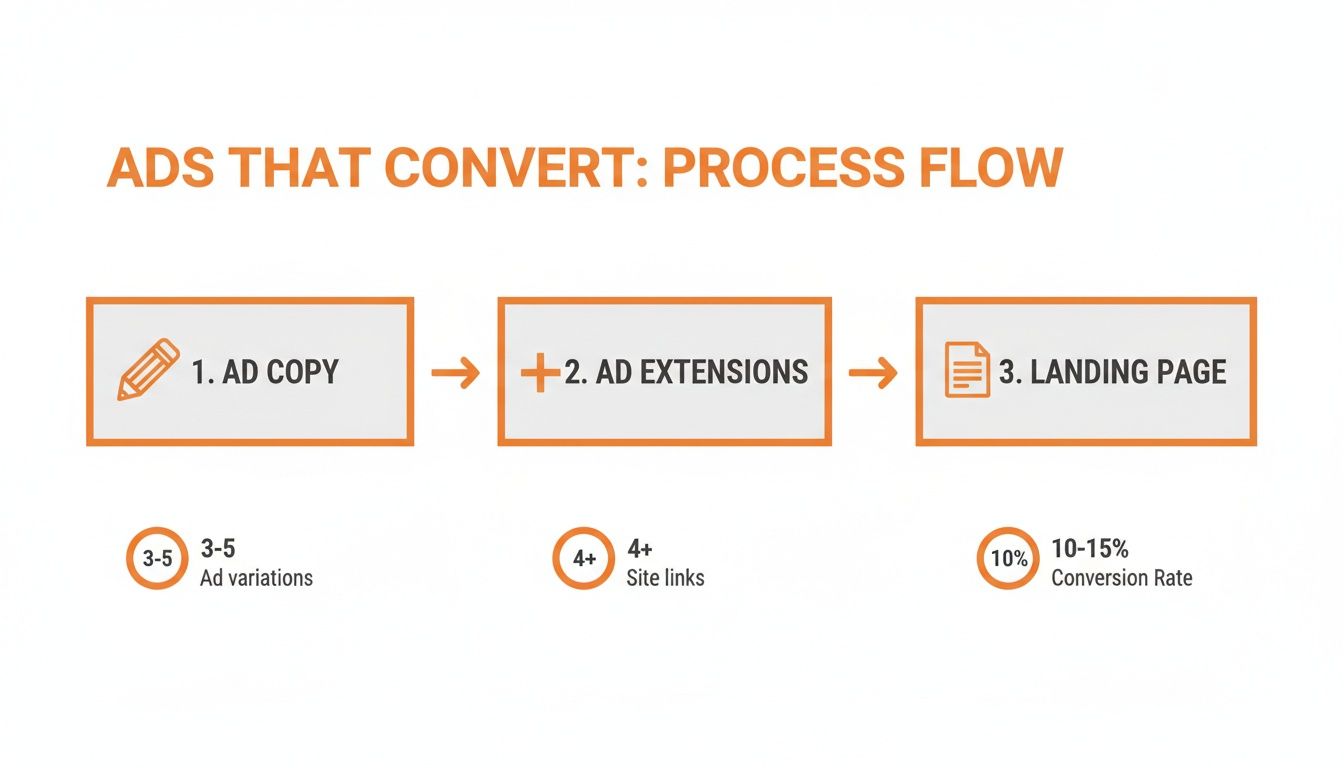
As you can see, a great ad is only half the battle. It needs to lead to an equally compelling landing page to create a seamless path for the user.
Your Practical PPC Optimization Checklist
Optimization isn't a one-and-done task; it's a routine. Think of it like tuning an engine. Here’s a simple checklist of what you should be doing regularly to keep your campaigns running smoothly.
Weekly Tasks
Dive into Search Term Reports: This is arguably the most valuable task you can do. The report shows you the exact phrases people searched for before clicking your ad. It’s a goldmine for finding irrelevant terms that are wasting your budget. For example, if you're a commercial painter, you might find you’re paying for clicks on "house painter." You'd immediately add "house" as a negative keyword to stop that waste.
Check Your Budget Pacing: Make sure your campaigns are spending their daily budget evenly. You don't want to run out of money by noon and miss out on all the valuable evening search traffic.
Bi-Weekly Tasks
A/B Test Your Ad Copy: You should always be testing. Take your best-performing ad and write a new version with one small change—maybe a different headline or a stronger call-to-action. Let them run against each other and see which one wins. Even tiny lifts in CTR add up significantly over time.
Make Smart Bid Adjustments: Use your data to guide your bidding. Are mobile clicks converting better? Bump up your mobile bid. Do you get more calls between 9 AM and 12 PM? Schedule a bid increase for that time slot. Seeing great results from Redondo Beach? Bid more aggressively for that specific location.
Monthly Tasks
Prune Your Keyword List: Take a hard look at your keyword performance. Pause or remove keywords that have a low CTR, a poor Quality Score, or simply aren't leading to conversions after a reasonable number of clicks. Don't be afraid to trim the fat. This is a core part of https://www.dllstudios.com/post/building-an-effective-keyword-optimization-strategy that ensures your budget is focused only on what works.
Analyze Geographic Performance: Your location reports can reveal surprising insights. You might discover that certain cities or even specific zip codes are driving much better results. This lets you double down on high-performing areas and pull back from ones that aren't delivering.
Let's turn this into an even more actionable format. It's one thing to see the data, but another to know what to do with it.
Connecting PPC Metrics to Real Actions
This quick-reference table helps translate common PPC metrics into specific tasks you can perform to improve your campaigns.
Metric to Watch | What It Tells You | Action to Improve It |
|---|---|---|
Low Click-Through Rate (CTR) | Your ad isn't grabbing attention or isn't relevant to the search query. | - A/B test new headlines and descriptions. - Refine keyword-to-ad group relevance. - Add compelling ad extensions (sitelinks, callouts). |
High CTR, Low Conversion Rate | Your ad is great, but your landing page isn't sealing the deal. | - Ensure landing page messaging matches the ad. - Simplify your form or call-to-action. - Improve mobile page speed and user experience. |
High Cost-Per-Conversion (CPC) | You're paying too much for each lead or sale. | - Improve Quality Score by tightening ad groups. - Pause expensive, low-performing keywords. - Mine the Search Term Report for negative keywords. |
Low Impression Share | Your ads aren't showing as often as they could be, likely due to budget or rank. | - Increase your daily budget. - Improve your Ad Rank by raising bids or Quality Score. - Check if negative keywords are blocking relevant searches. |
This table acts as a simple diagnostic tool. See a problem metric, find the probable cause, and take the recommended action.
By consistently following this process, your PPC campaign management evolves from a set-it-and-forget-it tactic into a proactive, data-driven strategy that gets better and more profitable over time.
Avoiding Common Mistakes and Knowing When to Get Help
It’s easy to get lost in the weeds with paid search. I’ve seen countless local businesses, with the best of intentions, fall into a few common traps that burn through their ad budget without generating a single lead. Successful PPC campaign management isn't just about what you do right—it's about sidestepping the mistakes that sink campaigns before they even have a chance to work.
One of the quickest ways to waste money? Bidding on keywords that are way too broad. Think about a handyman based in Encino who bids on the term "home repair." He's now competing with massive national brands and paying for clicks from people who are probably just looking for DIY articles, not to hire a pro. That one mistake can torch an entire month's budget in just a few days.
Another classic pitfall is completely forgetting about negative keywords. When you don't actively block irrelevant search terms, you're essentially leaving the door open for wasted ad spend. It's a simple step, but overlooking it means you're paying for clicks from searchers who have zero intent to buy what you're selling.
The Danger of a "Set It and Forget It" Mindset
Probably the most tempting mistake of all is launching a campaign and just letting it run on autopilot. This "set it and forget it" approach is a surefire way to lose money. Ad platforms are constantly changing, your competitors are adjusting their strategies, and what customers are searching for can shift overnight.
A campaign left to its own devices is prone to all sorts of problems:
Wasted Spend: Your ads might keep running for products that are out of stock or for services that are out of season.
Performance Decay: An ad that was a top performer last month can go stale, leading to a lower click-through rate and a plummeting Quality Score.
Missed Opportunities: If you're not digging into your search term reports, you'll never find the new, high-intent keywords that could be your next big lead source.
Letting a campaign run without frequent, data-driven adjustments is like trying to drive from Santa Monica to Pasadena with your eyes closed. You might move forward for a bit, but you're bound to end up somewhere you don't want to be.
The bottom line is that consistent monitoring and optimization are the bedrock of any profitable PPC strategy. It’s a hands-on process that separates the successful campaigns from the expensive learning experiences.
Knowing When It's Time to Call in an Expert
Look, managing your own PPC is definitely doable. But it’s also a serious time commitment, and it demands constant learning just to keep up with all the platform updates and new strategies. So, when does it make sense to hand the keys over to a professional agency?
There are a few clear signs that you might get more bang for your buck by bringing in an expert. If any of these sound familiar, it’s probably time to start looking.
You're Not Seeing a Positive ROI: Have you been running campaigns for a few months but can't confidently say you're making more than you're spending? An expert can audit your account, plug the leaks, and get you back on the path to profitability.
You Just Don't Have the Time: Good PPC management isn't a once-a-week task. It often requires daily check-ins on budgets, search terms, and performance. If you're swamped with the day-to-day of running your business, your campaigns are going to suffer.
You've Hit a Wall: Maybe you saw some great results early on, but now everything has flatlined. An agency can bring a fresh perspective and advanced tactics—like sophisticated bid adjustments or structured A/B testing—to push through that performance plateau.
You're Overwhelmed by It All: Let's face it, the world of PPC is full of jargon, complex bidding models, and constant algorithm changes. If you feel like you're in over your head, a pro can cut through the noise and just focus on getting you results.
Hiring an agency is an investment in your own efficiency and peace of mind. It frees you up to focus on what you're truly good at: running your business and taking care of your customers. Los Angeles is at the center of our service area, and we proudly support clients across a wide network of surrounding cities and neighborhoods throughout Southern California. Our reach includes every corner of L.A.—from Downtown Los Angeles, Hollywood, West Hollywood, Beverly Hills, and Santa Monica to the beach communities of Malibu, Venice, Marina del Rey, Hermosa Beach, Manhattan Beach, and Redondo Beach. We also extend service through the San Fernando Valley, including Sherman Oaks, Studio City, Encino, Van Nuys, North Hollywood, Burbank, Glendale, Pasadena, Woodland Hills, Chatsworth, Canoga Park, Reseda, Northridge, and Tarzana. In the San Gabriel Valley, we work with clients in Alhambra, Monterey Park, San Gabriel, Temple City, Rosemead, Arcadia, El Monte, South El Monte, West Covina, Covina, Baldwin Park, Azusa, Glendora, Duarte, and Monrovia. Farther southeast, we serve Whittier, Pico Rivera, Downey, Norwalk, La Mirada, La Habra, and Cerritos. We also support the South Bay—including Torrance, Carson, Gardena, Hawthorne, Inglewood, and Long Beach—as well as the Gateway Cities and communities throughout the I-10, I-5, 101, and 405 corridors. Whether you’re in a major metro area or a smaller surrounding neighborhood, our team delivers reliable, high-quality service anywhere in or around Los Angeles.
Common Questions About Managing Local PPC
Even with the best game plan, jumping into paid ads can feel a little overwhelming. Small business owners always have a few key questions about what to expect when the rubber meets the road. Let's clear up some of the most common ones.
How Much Should a Small Business Budget for PPC?
This is the big one, but the answer isn't as scary as you might think. There's no magic number, but a sensible starting point for many local businesses, especially in a competitive market like Los Angeles, is somewhere between $500 to $3,000 a month just for ad spend.
Where you land in that range really comes down to your industry's average Cost-Per-Click (CPC) and how tightly you're targeting. For instance, clicks for a luxury remodeling service in Beverly Hills will cost a lot more than clicks for a coffee shop in El Monte. The amount of competition right in your backyard, whether you're in the San Fernando Valley or down in the South Bay, is a huge factor.
My advice? Start with a test budget you're comfortable with, something you can afford to learn with. Point that initial spend at a super-focused campaign, and once you start seeing a positive Return On Ad Spend (ROAS), you can confidently start scaling up.
How Long Until I See Results from PPC?
You'll see traffic and clicks almost right away, which is exciting! But turning those clicks into consistent, profitable leads takes a bit of patience. Think of the first one to three months as a crucial "learning phase."
During this time, you're mostly gathering data, not necessarily raking in profits. This is when you'll figure out which keywords are duds, which ad copy connects with your audience in Pasadena, and what truly makes people in Long Beach click.
You'll see activity almost instantly, but give it a solid 90 days before you judge the campaign's real performance. Anything less is just a snapshot, not the full story.
This timeframe gives the ad platforms enough data to work their magic and, more importantly, gives you the insights you need to make smart adjustments.
What's a Good Click-Through Rate for a Local Business?
Honestly, a "good" Click-Through Rate (CTR) is all over the map depending on your industry, so don't get bogged down by generic stats. The average for search ads might be around 3%, but I've seen well-run local service campaigns pull in a CTR of 5-10%, sometimes even higher.
Instead of chasing a universal benchmark, focus on improving your own CTR month over month. A rising CTR is one of the best signs that your ads are hitting the mark with local searchers. Better relevance leads to a higher Quality Score, which Google rewards with lower costs and better ad placement. It's a win-win.
Should I Manage PPC Myself or Hire an Agency?
You can absolutely manage your own campaigns, especially with a smaller budget and a clear service area. But make no mistake, effective PPC campaign management is a real skill that takes time to learn and even more time to execute properly. The platforms are always changing.
It might be time to call in a pro if any of this sounds familiar:
You can't spare a few hours every week to monitor, tweak, and optimize.
You're not comfortable with the more technical side, like setting up conversion tracking or running A/B tests.
Your results have flatlined, and you're out of ideas for what to try next.
Hiring an agency often pays for itself. An expert can help you dodge expensive beginner mistakes and get you on the path to a profitable, lead-generating machine much faster.
Ready to stop guessing and start getting real results from your paid search campaigns? At DLL Studios, we specialize in data-driven PPC campaign management that connects local businesses with customers ready to buy. Let our team of experts build and optimize a strategy that drives growth, so you can focus on what you do best. Get in touch with us today!
