


.png)
A Complete Wix Harmony Review for Business Owners
- Jan 27
- 15 min read
After spending a few weeks hands-on with Wix Harmony, my hot take is pretty simple: this is Wix for non-designers who want AI to do everything. It's a fascinating new direction for the platform, but it also creates a clear divide in the Wix ecosystem, splitting it into Harmony for beginners, Studio for pros, and Classic as a legacy option.
So, here's our verdict right up front.
For a ton of small businesses—think a new boutique in West Hollywood or a local coffee shop in Redondo Beach—Harmony is a game-changer. It lets you spin up a beautiful landing page or a simple business site in literal minutes, completely skipping the traditional design headache.
But for professionals who build websites for a living? It feels dead on arrival.
Who Is Harmony For (And Who Should Run Away)?
The big trade-off with Harmony is control. You get an incredible amount of speed, but you sacrifice nearly all customization and advanced features. This is a critical distinction that neatly sorts Wix’s offerings into three very different buckets.
Wix Harmony: Perfect for total beginners, quick small business sites, and landing pages. If you don't care about a CMS or custom logic, you'll love how fast it is.
Wix Studio: This is still for people who actually build websites. It gives you full design control, a powerful CMS, and the ability to drop in custom code for complex, scalable projects.
Wix Classic: Honestly, this now feels like a legacy zombie. It's somehow still alive but feels increasingly outdated next to the specialized focus of Harmony and Studio.
This flowchart really helps visualize where you might land based on your needs.
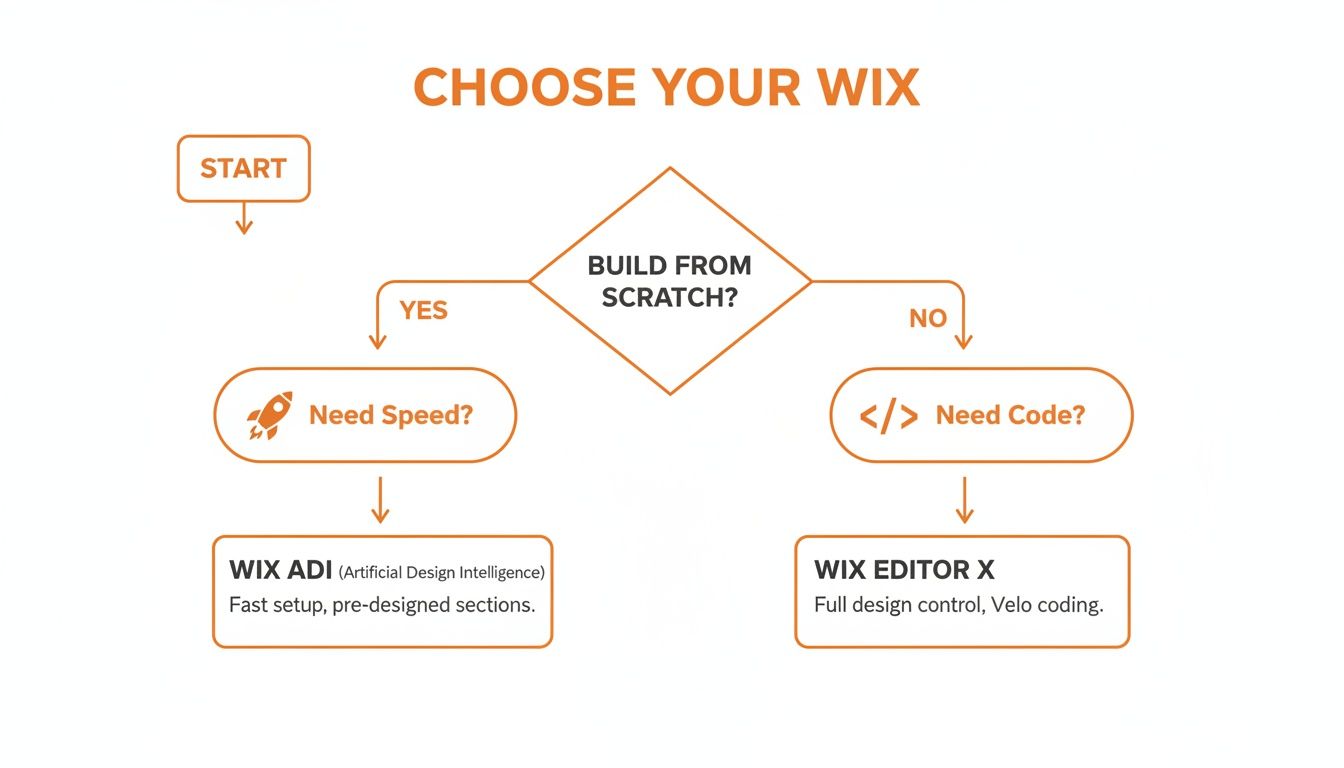
As the chart makes clear, if you just want a fast, AI-driven launch, Harmony is your ticket. For pretty much everything else that requires professional-grade tools, Studio is the only real answer. My big question is what happens when people need advanced features Harmony doesn't have yet. Will Wix actually add them, or are we stuck going back to Classic (which feels like going backwards) or just rebuilding in Studio?
Wix Platform Showdown Harmony vs Studio vs Classic
To make it even clearer, here’s a quick comparison to help you understand where each Wix editor excels and for whom.
Platform | Ideal User | Key Feature | Limitations |
|---|---|---|---|
Wix Harmony | Beginners, small businesses, solo entrepreneurs | AI-driven site generation in minutes | No CMS, no custom code, limited design controls |
Wix Studio | Agencies, freelancers, professional designers | Full design control, advanced animations, custom code, robust CMS | Steeper learning curve, more complex for simple sites |
Wix Classic | Existing users, hobbyists | Familiar drag-and-drop editor | Dated interface, less responsive control than Studio |
Ultimately, Wix has drawn a line in the sand. Harmony is for speed, Studio is for control, and Classic is... well, it's just kind of there. Knowing which side of that line you fall on is the key to picking the right tool.
How Wix Harmony Builds Your Website with AI
So, how does Wix Harmony actually bring your website to life? The best way to think about it is like briefing an AI design assistant for a new project. You give its AI agent, Aria, a prompt that describes your business, who you're trying to reach, and the overall 'vibe' you're going for. From there, it generates a complete, ready-to-edit website from the ground up.
This is a huge shift from how website builders have traditionally worked. Instead of staring at a blank canvas and dragging elements into place one by one, you're essentially handing off the heavy lifting to a robot. This frees you up to focus on the creative details and getting the content just right.
The whole process is built for speed and simplicity. A small business owner in Santa Monica can go from a simple idea to a professional-looking site in a tiny fraction of the usual time. It’s all about tearing down the technical walls that stop people from getting online.
From Prompt to Published Site
The path from an idea to a finished website is incredibly direct. It all starts with a single, descriptive prompt. You just tell Aria what kind of website you need, making sure to include the key details that define your brand and what you want to accomplish.
In our own tests, we found that the more specific you are, the better the first draft turns out. A good prompt should include things like:
Business Type: Instead of "hair salon," try "a modern hair salon in downtown Los Angeles."
Key Features: Be sure to mention must-haves like "online booking," "a service menu," and "customer testimonials."
Desired Vibe: Use descriptive words that set the tone, like "chic and minimalist" or "warm and inviting."
Within a few minutes, Aria serves up a fully designed site, complete with surprisingly relevant images, text, and even videos that match your description. From there, you can either hit regenerate with a new prompt or just dive right in and start editing yourself.
The Power of an AI-Human Hybrid
This is where the platform really starts to feel special. Unlike some of the more rigid AI-only tools out there, Harmony lets you bounce between prompting Aria for big-picture changes and making fine-tuned manual edits. You can easily tweak layouts, adjust colors, rewrite copy, and add or remove pages whenever you want.
This hybrid approach is the heart of the Wix Harmony experience. It’s not just about an AI generating a site for you; it's about an AI collaborating with you to perfect it. That’s a massive step forward from the original Wix ADI.
This flexibility is a game-changer for business owners. The launch of Wix Harmony definitely caught the market's attention, sending company shares up 10.4% in a single week back in January 2026, thanks in part to a refreshed Super Bowl ad campaign. With the global website builder industry already valued at $2.1 billion and still growing, Harmony’s AI-first approach is a major move by Wix to keep its top spot.
Of course, since Wix Harmony uses artificial intelligence to build the site, it’s crucial for business owners to also understand how AI is changing SEO and what it means for getting found online. After all, building a great site is only half the battle. For businesses in competitive markets from Beverly Hills to the San Gabriel Valley, a solid SEO strategy is non-negotiable. You might also want to check out how an AI Assistant Site template can help streamline this process even more.
Key Features and Critical Limitations

After spending a few weeks putting Wix Harmony through its paces, I can tell you its core promise is undeniably impressive. It delivers on creating a functional website from a simple prompt in just a few minutes. That kind of speed is a huge plus for a new business, say, in the San Fernando Valley, that just needs to get something online right now.
But that speed comes at a price. The platform's simplicity is also its biggest handicap. If you're a professional web developer or a business with serious growth plans, you'll hit a wall almost immediately.
The Good: What Harmony Excels At
Wix Harmony is built for a very specific person: someone who needs a site up yesterday and cares more about speed than anything else. For that user, it’s almost perfect.
Instant Site Generation: This is the magic trick. Type in a prompt, and Harmony spits out a complete, multi-page website. It completely sidesteps that initial design paralysis that stops so many non-designers in their tracks.
Built-in Business Tools: Harmony plugs right into Wix’s massive ecosystem of business apps. You can add e-commerce, booking systems, or event management without ever touching a line of code. It just works.
Automatic Responsiveness: Every site Harmony builds is automatically mobile-friendly. It looks good on a phone, a tablet, and a desktop, which is table stakes these days but still a feature you don't have to think about.
These strengths make Harmony cool for quick small business sites or landing pages. It genuinely makes web design accessible for people who don't need or want deep customization.
The Bad: Where Harmony Falls Short
This is where the dream ends for any professional use case. After getting my hands dirty with it, it's clear: Wix Harmony is dead on arrival for pro workflows. The limitations aren't just minor quirks; they are fundamental roadblocks that make it impossible to scale or build anything truly custom.
The most glaring omission is the complete lack of a traditional Content Management System (CMS). A CMS is the engine of any serious website, letting you manage big libraries of content like blog posts, product catalogs, or property listings. Without it, you're stuck updating every single piece of content on its individual page. That’s a nightmare for any growing business.
For a professional agency or a business with ambitions to scale, the lack of a CMS and custom code support isn't just a missing feature—it's a deal-breaker. It locks you into a simple, static framework with no room for future growth or unique functionality.
On top of that, Harmony offers zero support for Velo, Wix’s powerful custom code platform. That means no custom logic, no connecting to external APIs, and no creating unique user interactions. You simply can't build anything more complex than a basic informational site or a cookie-cutter e-commerce store. For businesses in competitive markets from Downtown Los Angeles to Hollywood that need a real digital edge, this is a non-starter.
Now, don't get me wrong, Wix is a giant. They command a 45% share of the website builder market with over 8 million live sites. The platform's 99.99% uptime and growing bookings (which you can track on Nasdaq) point to a rock-solid infrastructure. But those strengths belong to its big brothers, Studio and Classic. Harmony might run on that foundation, but its own feature set leaves a massive gap for anyone needing more.
Who Should Actually Use Wix Harmony

After spending weeks putting Wix Harmony through its paces, one thing is crystal clear: this is not a one-size-fits-all platform. It’s a specialized tool built for a very specific kind of user. To give you a proper wix harmony review, let's get beyond the marketing jargon and talk about who this thing is actually for—and, more importantly, who should run in the opposite direction.
The whole idea behind Harmony is a simple trade-off: you give up deep creative freedom in exchange for incredible speed. If you're not a designer and you need a professional-looking website live, like, yesterday, then Harmony is your best friend. It’s built to bulldoze the technical and design roadblocks that typically stop small business owners in their tracks.
Think of it this way: you can hire a crew to build a custom home from the ground up, or you can buy a beautifully staged model home that’s move-in ready. The custom build offers endless possibilities but takes time and expertise. The model home is ready now, but you're working with the existing floor plan. Harmony is the model home of website builders.
The Ideal Harmony User Profile
At its core, Harmony is for the business owner who wants AI to take the wheel. The priority here is speed and simplicity over everything else. These are the folks who want a good-looking site online in hours, not weeks, and they don't have a designer or developer on payroll.
Here’s who I see thriving with Wix Harmony:
The New Restaurant: A cafe opening up in Long Beach needs a simple, clean site to show off its menu, post its address, and plug in an online ordering system. They don't need a sprawling blog or fancy custom features. They just need to get online and start serving customers.
The Local Service Provider: A plumber in Glendale or an accountant in Pasadena needs a digital business card that looks legit. The website’s job is to list services, provide a phone number, and build a little trust with a professional design. That's it.
The Event Promoter: Someone putting on a one-time workshop in Hollywood needs a landing page to sell tickets and share event details. Time is everything, and being able to spin up an attractive, functional page in an afternoon is a huge win.
The common thread here? The business needs are immediate and straightforward. None of these examples require a heavy-duty content management system (CMS) or custom databases. This is Harmony's sweet spot.
Who Should Absolutely Avoid Wix Harmony
While Harmony is fantastic for a quick launch, it’s a total dead end for anyone with serious professional or scaling ambitions. The very things that make it simple for a beginner become massive roadblocks for more complex projects. With no CMS, no custom code, and no fine-grained design control, it's a non-starter for a huge slice of the business world.
You need to look elsewhere if you're one of these people:
The Ambitious E-commerce Store: A boutique in Beverly Hills planning to manage hundreds of products with detailed filtering and inventory management will outgrow Harmony before they even finish uploading their first collection. They need the powerhouse e-commerce tools baked into Wix Studio.
The Real Estate Agency: An agency serving the South Bay has to manage thousands of property listings, each with its own data, maps, and agent info. This is completely impossible without a CMS and dynamic pages, neither of which Harmony offers.
The Tech Startup: A new company in Santa Monica that needs to integrate with third-party APIs, build out custom user dashboards, or implement unique business logic is going to hit a brick wall. This requires access to code (like Velo), which is a Wix Studio exclusive.
My hot take after weeks of use is this: Harmony is a tool for launching a static online presence, while Studio is a platform for building a dynamic digital business. Understanding this distinction is the key to making the right choice from the start.
If you choose Harmony when what you really need is Studio, you're setting yourself up for a frustrating and costly do-over down the road.
Navigating the New Wix Ecosystem
Wix isn't just one platform anymore. With the launch of Harmony, the company has split its offerings into three very different paths, each built for a completely different type of user. It’s critical to understand this new landscape before you jump in, because picking the wrong lane can cause some serious headaches later on.
After spending a few weeks testing Harmony, it’s obvious this split is intentional. Wix is essentially creating separate sandboxes for separate needs. It’s less of a single product line now and more of a "choose your own adventure" where your first decision locks you in.
Think of it like choosing a vehicle. You wouldn't buy a Ferrari to haul lumber, and you wouldn't take a semi-truck on a quick grocery run. Each is built for a specific job, and Wix is now rolling out its own specialized fleet.
The Three Lanes of Wix Development
The new Wix world boils down to three distinct platforms, each with its own philosophy and target user. It's a clear strategy to serve everyone from total beginners to professional agencies.
This division makes sense when you look at Wix's massive footprint in the market. Harmony’s launch in early 2026 came when Wix already owned 45% of the website builder space. With around 8 million live sites—nearly three times its closest competitor—Wix has the customer base to justify this specialized approach. You can dig into the numbers in this 2026 industry news update.
Here’s the simple breakdown of the new ecosystem:
Wix Harmony: This is the beginner AI builder. It’s for people who aren’t designers and just need a good-looking site, fast, without any drama.
Wix Studio: This is the pro platform. It's where agencies and developers will spend their time, offering total design freedom, a powerful CMS, and the ability to add custom code.
Wix Classic: This is the legacy zombie. It’s the old-school drag-and-drop editor many people know, but honestly, it feels like a ghost town next to the shiny new specialized tools.
The Elephant in the Room: The Harmony Growth Problem
This new, divided ecosystem raises one massive question: what happens when your business outgrows Wix Harmony? A small startup in Venice or a growing shop in the San Gabriel Valley might start with simple needs but quickly find they need more advanced tools as they scale.
And here we arrive at the platform’s biggest flaw—a deal-breaker for any serious wix harmony review. There is currently no direct migration path from a site built on Harmony to one on Wix Studio.
This isn't just a minor hiccup; it's a complete dead end. If you build your site on Harmony and later realize you need a real CMS for a blog, custom code to connect an API, or advanced design controls, your only option is to scrap everything and rebuild your entire website from scratch in Wix Studio.
This is a huge pain point for any business with ambition. All the time, money, and energy you poured into your first Harmony site are essentially thrown away. This makes your initial choice more important than ever. You’re not just picking a tool for today; you're placing a bet on what your business will need tomorrow. If there's even a small chance you'll need to scale, you need to think long and hard before starting with Harmony. To see what the alternative looks like, you can learn more about what Wix Studio is and how it works in our guide.
The bottom line is simple: choose wisely from day one.
Getting the Most Out of Your Wix Website
While this wix harmony review shows the platform is a phenomenal tool for getting a site launched fast, an AI-built website is just the starting line. Real online success isn't just generated by an algorithm; it takes a human touch and a smart strategy to turn a good-looking site into a hard-working business asset.
Think of Harmony as the foundation of your new building. It’s strong and built in record time, but it’s still an empty structure. To turn it into a thriving business, you need the architects and interior designers to come in, optimize the layout, attract the right people, and make sure every visitor has a clear path to becoming a customer.
That's where our expertise comes in. We take a Harmony site from good to great by blending AI's raw speed with proven growth strategies.
Turning AI Speed into Business Growth
An AI can assemble a website, but it can't build a local reputation. Our team takes these AI-generated sites and layers on strategic on-page SEO, making sure your content is perfectly aligned with what your actual customers are searching for. Los Angeles is at the center of our service area, and we proudly support clients across a wide network of surrounding cities and neighborhoods throughout Southern California. Our reach includes every corner of L.A.—from Downtown Los Angeles, Hollywood, West Hollywood, Beverly Hills, and Santa Monica to the beach communities of Malibu, Venice, Marina del Rey, Hermosa Beach, Manhattan Beach, and Redondo Beach. We also extend service through the San Fernando Valley, including Sherman Oaks, Studio City, Encino, Van Nuys, North Hollywood, Burbank, Glendale, Pasadena, Woodland Hills, Chatsworth, Canoga Park, Reseda, Northridge, and Tarzana.
Here’s a peek at how we do it:
Deep Keyword Research: We uncover the exact phrases potential customers in communities like Downey, Glendale, or Santa Monica are using to find services just like yours.
Content Strategy: We refine the website copy so it not only ranks high but also speaks directly to your audience, building trust and encouraging them to take the next step.
Technical SEO Audits: We make sure your site's backend is flawless, tackling everything from site speed to mobile optimization to give you a solid edge over the competition. You can learn more about the technical side in our guide to mastering Wix Studio SEO.
Optimizing for Conversions, Not Just Clicks
Getting traffic to your site is only half the battle. The real goal is turning those visitors into paying customers, and that's where conversion rate optimization (CRO) comes in. We analyze how users behave on your site to find friction points, then make data-driven changes that boost leads, sales, and sign-ups.
Combining AI's rapid development with expert human strategy is the formula for achieving real business goals. It's about making sure your investment in a new website delivers a measurable return.
To really unlock the potential of your Wix Harmony website, implementing powerful Conversion Rate Optimization strategies can make a huge difference in your signups and sales.
Whether you’re in a major metro area or a smaller surrounding neighborhood, our team delivers reliable, high-quality service anywhere in or around Los Angeles. If you want to make sure you choose the right Wix platform for your long-term success, give us a call at (650) 260-4067 for a consultation.
Frequently Asked Questions About Wix Harmony

As you get closer to a decision on this new AI website builder, a few questions are bound to pop up. This last part of our wix harmony review gives you straight answers to the most common ones, helping you figure out if it's the right fit.
Can I Add Custom Code or a CMS to Wix Harmony?
No, and this is probably the single biggest deal-breaker for some. Wix Harmony is a totally closed ecosystem, built from the ground up for simplicity. That means it doesn't support custom code through Velo or allow you to bring in a Content Management System (CMS).
This is a really important distinction. If your business relies on database collections for things like real estate listings, needs custom functions for a unique user experience, or has to integrate with any APIs, then Wix Studio is your only path forward. Harmony is made for people who don’t care about a CMS or custom logic.
What Happens When My Business Outgrows Wix Harmony?
This is a huge point of concern we flagged during our tests. As it stands, there is no direct migration path from a Wix Harmony site over to a Wix Studio site. If your business takes off and you suddenly need advanced features like a CMS or Velo, you will have to completely rebuild the website from scratch on the Studio platform.
This lack of an upgrade path is the biggest risk for ambitious businesses. Choosing Harmony means you're betting that your needs won't become more complex in the future. If they do, you'll be facing a full do-over, which feels like a huge step backward.
This reality makes it critical to think about your future growth before you commit. A small local business in Whittier might be perfectly fine, but a growing brand in Hollywood should think twice.
Is Wix Harmony Good Enough for SEO?
Wix Harmony gives you all the essential on-page SEO tools that come standard across the entire Wix platform. You can tweak your meta descriptions, manage structured data, and get the benefit of a mobile-first design—a solid foundation for any small business.
But let's be real, a basic setup is rarely enough. To actually compete in crowded markets like Los Angeles or the San Gabriel Valley, you need a much more aggressive strategy. That means consistent content creation, building local citations, and diving into technical optimizations that go way beyond what the platform provides out of the box.
How Does Harmony Compare to Other AI Builders?
Harmony's main edge is how neatly it fits into the proven Wix ecosystem. While competitors like Durable or Framer AI offer some impressive features, Harmony is built on Wix's rock-solid infrastructure.
This gives you dependable hosting, strong security, and access to a massive app market for business tools like e-commerce and online bookings. For a small business owner in Pasadena or Glendale, that kind of reliability makes it a safe bet from day one. You're getting the speed of AI combined with the stability of a market leader.
If you're ready to combine the power of AI with an expert strategy to build a website that delivers real results, the team at DLL Studios is here to help. Contact us today for a personalized consultation to find the perfect solution for your business.

