


.png)
A Complete Guide to Building Websites with Wix Studio
So, what exactly is Wix Studio? Think of it as the professional-grade workshop that web creators, agencies, and freelancers graduate to when they need more power than what a standard website builder can offer. It's a huge leap forward from the classic Wix editor, designed to close the gap between simple drag-and-drop tools and the heavy lifting required by code-first platforms.
A Professional Platform for Modern Web Creators
Wix Studio is more than just an update; it's a completely reimagined environment built from the ground up for agencies and freelancers. It delivers the kind of creative freedom and sophisticated features needed to build complex, scalable websites, all without the usual limitations of WYSIWYG editors.
This is a really important distinction. The classic editor was fantastic for making web design accessible to just about anyone. But Wix Studio is aimed squarely at professionals who are paid to deliver top-tier results for their clients. It’s the perfect fit for a Los Angeles business—whether that's a trendy boutique in Beverly Hills or a corporate law firm in Downtown LA—that needs a polished and high-performing website. If you want to dig deeper into what makes this jump so significant, check out why upgrading from Wix Classic to Wix Studio is essential for your website.
Here's a look at the new interface, which really highlights its clean, organized workspace built for pros.

The dashboard immediately shows off the collaborative tools and multi-site management features that make it clear this platform was built for handling multiple projects at scale.
Bridging Simplicity and Power
For years, the web design world felt like a two-party system. You could have the ease of a drag-and-drop builder, or you could have the infinite power of a code-heavy platform like WordPress. Wix Studio was engineered to live right in that sweet spot in between, giving you the best of both.
It pairs an intuitive visual canvas with fine-tuned, granular control over every single design element. What does that mean in practice? An agency can now rapidly prototype a site for a client in Marina del Rey and, in the same platform, turn around and implement custom code for a tech startup over in Studio City.
Wix Studio lets professionals build a huge variety of online platforms. That flexibility is a major part of its appeal, even extending to more complex projects like creating successful membership sites with Wix.
To help you get a clearer picture of what Wix Studio brings to the table, here's a quick rundown of its core features and the direct benefits they offer.
Wix Studio at a Glance: Key Features and Benefits
Feature | Description | Primary Benefit for Your Business |
|---|---|---|
No-Code Animations & Interactions | Create sophisticated animations and scroll effects without writing a single line of code. | Boosts user engagement and creates a memorable, dynamic brand experience. |
Responsive AI & Grid Layouts | AI-powered tools and CSS grids help you build fully responsive designs that adapt to any screen size. | Ensures a flawless user experience on all devices, which is critical for SEO and conversions. |
Velo by Wix (Full-Stack Dev) | An open development platform for adding custom JavaScript, connecting to APIs, and building web apps. | Unlocks limitless functionality, allowing you to build completely custom solutions for unique client needs. |
Centralized Workspace | A single dashboard to manage all client sites, subscriptions, team members, and projects. | Dramatically improves agency efficiency and streamlines your entire workflow. |
Reusable Assets & Libraries | Create and save design assets, custom templates, and sections to reuse across projects. | Speeds up the development process and ensures brand consistency for clients. |
Seamless Client Handover | Provide clients with a simplified content editor so they can update text and images without breaking the design. | Empowers clients to manage their own content while protecting your design integrity. |
This table just scratches the surface, but it highlights how every feature is thoughtfully designed to address the real-world challenges faced by web design professionals.
Built for Agencies and Freelancers
The platform’s DNA is all about professional workflows. It isn't just about building one-off websites; it’s about efficiently managing an entire portfolio of client projects.
A few standout features really drive this home:
A Centralized Workspace: One dashboard to rule them all. Manage every client site, their subscriptions, and your team members from a single, organized hub.
Reusable Design Assets: Speed up your build process by creating your own templates and reusable sections. Perfect for spinning up new projects quickly.
Seamless Client Handover: Give your clients a simplified editor where they can update text and images. They get the control they need, and you don't have to worry about them accidentally wrecking the layout.
Advanced Code Capabilities: With Velo by Wix, you can inject custom JavaScript, tap into external APIs, and build genuinely unique web applications.
This intense focus on the professional workflow is what makes Wix Studio such a powerful tool. It understands that building the site is just one piece of the puzzle—managing client relationships and scaling your agency are just as vital. Considering Wix already serves over 258 million registered users and holds roughly 13% of the website builder market, Studio is perfectly positioned to serve this massive ecosystem at a much higher level.
A Look Under the Hood: The Core Features of Wix Studio
So, what actually makes Wix Studio different? Beyond the hype, it's a collection of powerful, practical tools built specifically for web professionals. These are the features that separate it from the usual website builders, giving you a mix of creative freedom, serious efficiency, and advanced capabilities.
Let's pull back the curtain and see what makes this platform tick.
At its heart is a brand-new design editor that finally gives creators the precision they've been asking for. It's a huge leap past the simple drag-and-drop systems of old, offering a much more sophisticated space to build complex, pixel-perfect sites that work flawlessly on any device.

This isn’t just a minor update; it’s a complete rethink of how sites are built in the Wix world. It’s designed from the ground up to meet the high standards of modern web agencies and their clients.
The Responsive Editor: Digital Clay for Modern Design
Imagine trying to build a sculpture with a box of rigid, pre-made blocks. That’s what using many older website builders feels like. Wix Studio's editor, on the other hand, is like working with digital clay—it's fluid, forgiving, and gives you total control over the final product.
This is all made possible by baking modern web technologies right into the editor:
Responsive AI: This clever feature takes a look at your design and automatically suggests responsive layouts for different screens. It's a huge time-saver and a smart starting point that you can then tweak to perfection.
CSS Grid & Flexbox: These are the industry standards for creating complex, two-dimensional layouts. Wix Studio gives you a visual interface to control their power, letting you build intricate designs that used to require custom code.
Proportional Sizing: Instead of locking elements to fixed pixel values, you can set their sizes using percentages or other relative units. This means your designs scale smoothly and keep their integrity, whether they're on a giant monitor or a tiny phone screen.
This toolkit means an agency can build a site for a client in a fraction of the time, knowing it will look great everywhere. For a better sense of what's possible, check out some Wix Studio templates to see these tools in action.
Advanced CMS for Dynamic Content
A beautiful website is useless without great content. Wix Studio comes with a powerful Content Management System (CMS) built to handle huge, dynamic sets of information without breaking a sweat. For any business that relies on content, this is a game-changer.
Think about a real estate agency with thousands of property listings. Each listing has dozens of data points: price, square footage, photos, agent info, location. Creating a separate page for each one by hand would be an absolute nightmare.
With the Wix Studio CMS, you design a single, beautiful template for a property listing. The CMS then pulls data from your database to automatically populate that template, generating thousands of unique pages instantly.
This isn't just for real estate. It's perfect for things like:
Event calendars for music venues
Team directories for law firms
Recipe databases for food blogs
Service catalogs for contractors
The CMS also lets clients manage their own content through simple forms, all without ever touching the site's design. This keeps your work safe while giving the business owner the control they need to run their day-to-day operations.
Developer Tools for Limitless Customization
While Wix Studio is fantastic as a no-code platform, it doesn't put a ceiling on your ambition. For projects that need truly unique functionality, it opens up a suite of powerful developer tools, mainly through Velo by Wix.
Velo is a full-stack development platform that lets you write custom JavaScript on both the front-end and the back-end. This blows the doors wide open, allowing you to build custom web applications and integrations that standard templates could never handle.
Here’s what that looks like in the real world:
Custom APIs: An e-commerce store could build a custom API to sync its inventory directly with a supplier's warehouse, automating stock updates in real time.
Third-Party Integrations: A local clinic could integrate its website's booking system with specialized medical records software, making patient intake a breeze.
Bespoke Interactions: A creative agency could develop unique, interactive user experiences and animations that go far beyond the built-in effects.
By including these developer-focused features, Wix Studio makes sure it can grow with a business. It's a platform that's easy to get started with but has the depth to handle the most complex and ambitious web projects down the road.
How Wix Studio Drives Real Results for E-commerce and Local Businesses
All the features in the world don't mean much until you see how they solve real-world problems. This is where Wix Studio shines—it takes advanced design tools and a powerful CMS and turns them into tangible growth for e-commerce brands and local service providers. For businesses across Los Angeles, from a boutique in Santa Monica to a contractor in Glendale, these capabilities are what drive sales and bring in new clients.
Wix Studio isn't a one-size-fits-all platform. It's a specialized toolkit that adapts to the unique challenges of different business models. Whether you need to turn a casual browser into a paying customer or a local searcher into a long-term client, the tools are designed for that specific job.
Fueling Growth for E-commerce Brands
For any online store, a smooth and engaging shopping experience is everything. Wix Studio goes way beyond basic store templates, giving you the power to build a custom retail environment that actually converts visitors and keeps them coming back.
Think of a fashion boutique in Santa Monica. Instead of being stuck with a rigid, cookie-cutter product page, they can use Wix Studio to design completely custom displays. They can showcase their clothing with rich visuals, detailed descriptions, and even embed video lookbooks—all without touching a line of code.
This level of control touches the entire customer journey:
Multi-Channel Inventory Management: The boutique can sync its inventory across its website, social media shops, and other marketplaces. This is huge for preventing overselling and keeping operations running smoothly from the moment a customer discovers a product to when it arrives at their door.
Abandoned Cart Automations: We all know how many shoppers leave items in their cart. Wix Studio has built-in automations that can send out personalized email reminders, maybe with a small discount, to bring those customers back and recover otherwise lost sales.
Secure Payment Processing: It integrates with a huge range of payment gateways, giving customers a secure and easy checkout. This is absolutely critical for building trust and getting that final click to buy.
By blending bespoke design with smart e-commerce logic, Wix Studio helps brands create an online store that doesn't just look professional—it functions as a high-powered sales machine. That builds customer confidence and directly boosts the bottom line.
The platform's success is obvious on a larger scale. Industry reports confirm hundreds of thousands of active stores are powered by Wix, with some estimates putting the number over 700,000. Together, these stores are doing billions in annual sales, proving the platform is a serious contender in the e-commerce world. For more detailed insights, you can always check out their quarterly reports.
Helping Local Businesses Dominate Their Market
For a local service business—say, a dental practice in Glendale or a contractor in the South Bay—the main goal is getting new clients. A beautiful website is nice, but what really matters is showing up when potential customers in your area are searching for your services.
Wix Studio comes loaded with a suite of tools built for exactly this. It helps a business own its local search rankings and turn website traffic into appointments and contracts. It does this by seamlessly integrating a few key features that all work together.
These essential tools include:
Advanced Local SEO Settings: Business owners can easily manage their Google Business Profile, add local business schema, and optimize their site for specific keywords like "dentist in Glendale."
Built-in Booking Systems: That contractor in the South Bay can integrate a sophisticated booking system right on their site. Clients can schedule consultations, get quotes, and even pay deposits without ever having to pick up the phone.
Schema Markup Capabilities: Wix Studio simplifies adding structured data (schema) to a site. This helps search engines understand what your business does, where it is, and its hours, which often leads to more prominent, eye-catching search results.
When an expert agency gets their hands on these tools, the return on investment can be massive. An agency can fine-tune every last SEO detail, build out location-specific landing pages for neighborhoods from Pasadena to Torrance, and track performance to make sure the website is a consistent source of qualified leads. It's how a website goes from being a digital brochure to a primary engine for business growth.
Comparing Wix Studio, Webflow, and WordPress
Picking a website platform is a huge decision, and today’s market is packed with heavy hitters. For anyone building a serious, professional-grade website, three names keep coming up: Wix Studio, Webflow, and the old reliable, WordPress. Each one gives you a different road to building an online presence, but they are absolutely not the same.
To cut through the marketing fluff, you have to look at what each platform is really about and how it handles the things that actually matter to your business. This isn't about finding the single "best" platform—it’s about finding the right one for your team, your technical skills, and where you want to go.
This simple decision tree can give you a starting point for figuring out which platform aligns with your business model.
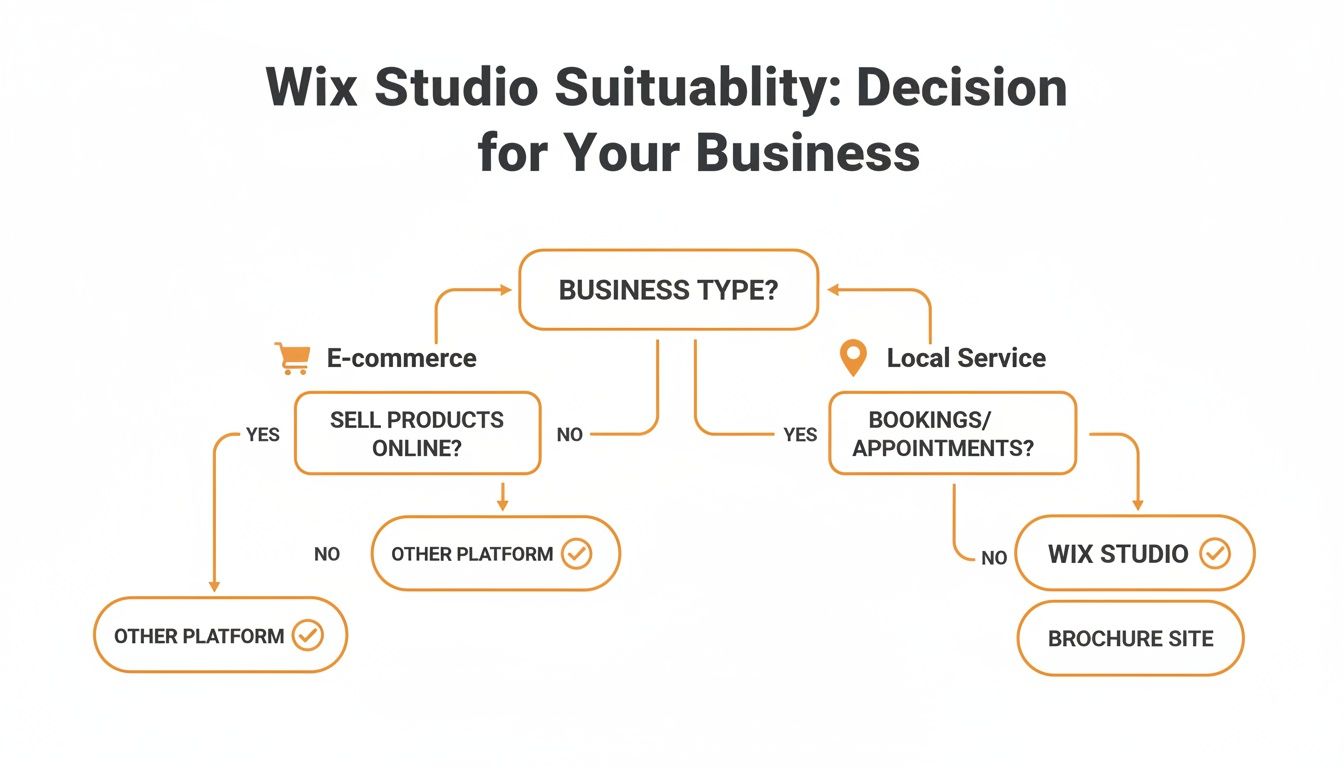
As you can see, different needs—like a deep focus on e-commerce versus a local service business—will naturally push you toward a platform that’s built for that world.
Understanding the Three Contenders
On the surface, each of these platforms carves out its own niche. A good way to think about them is like different types of vehicles, each built for a specific kind of trip.
WordPress is the ultimate workhorse. It’s an open-source giant you can bend and twist into almost anything imaginable. But that endless flexibility comes with a catch: you're on the hook for everything. Hosting, security, plugin updates, performance—it's all on you.
Webflow is the designer's dream tool. It gives you incredible visual control over code, letting you craft jaw-dropping custom animations and interactions. The downside? It has a notoriously steep learning curve, making it a tough sell for clients and non-designers who just want to update a blog post.
Wix Studio strikes a strategic balance. It delivers the sophisticated design power and robust business tools that agencies crave but wraps it all in a secure, managed, all-in-one environment. It’s built to give you the best of both worlds: professional power without the constant maintenance headaches.
Head-to-Head: Platform Showdown
To make a smart choice, let’s break down how these platforms stack up in the areas that matter most to a business owner.
This table gives a quick, side-by-side look at how Wix Studio, Webflow, and WordPress compare on the key decision-making points for agencies and businesses.
Platform Showdown: Wix Studio vs. Webflow vs. WordPress
Criteria | Wix Studio | Webflow | WordPress |
|---|---|---|---|
Design Freedom | High, with responsive AI, CSS grid, and no-code animations. | Very high, with deep control over code and interactions. | Unlimited, but heavily reliant on themes and page-builder plugins. |
Client Usability | Excellent, with a simplified content-only editor for clients. | Challenging for non-technical clients to update content safely. | Varies wildly depending on the theme and builder used. |
Maintenance | Low, as hosting, security, and updates are fully managed. | Low, with managed hosting and security included. | High, requiring manual updates, security plugins, and hosting management. |
SEO Power | Strong, with comprehensive built-in SEO tools and schema control. | Strong, with clean code and full control over SEO settings. | Excellent, but requires multiple plugins for full functionality. |
Total Cost | Predictable, based on a single monthly or annual plan. | Moderate, with tiered pricing based on site traffic and features. | Highly variable, with costs for hosting, themes, and premium plugins. |
The pattern here is pretty clear. WordPress gives you ultimate freedom but makes you pay for it with complexity. For those who go the WordPress route, looking into services like managed hosting for WordPress can make life easier, but it's yet another separate piece to manage and pay for.
The Real Cost of Ownership
When you’re looking at platforms, the monthly plan price is just the tip of the iceberg. The real cost includes the time you’ll spend on maintenance, the money you’ll shell out for premium plugins, and the potential losses from a security breach or unexpected downtime.
Wix Studio and Webflow offer a much more predictable cost model. Their all-in-one approach means you pay one fee for hosting, security, and platform features, which gets rid of the surprise bills that often pop up with a WordPress site.
WordPress might be "free" to download, but the costs add up fast:
Hosting: This can range from cheap shared plans to expensive dedicated servers.
Premium Themes: Usually a one-time or annual fee.
Essential Plugins: Costs for SEO, security, caching, and forms can easily run into hundreds of dollars a year.
Developer Time: When something breaks—and it will—you’ll probably need to pay a professional to fix it.
This is exactly where Wix Studio shows its true value. It merges the design sophistication that professional agencies need with a fully managed environment. This frees up businesses and creators to focus on strategy and content instead of playing tech support. For an even deeper comparison, our guide on Wix Studio vs WordPress vs Shopify digs into the details even further.
At the end of the day, the right choice comes down to your team's skills and what you value most. If you have a dedicated tech team and need limitless customization, WordPress is still a beast. If your only goal is to push the visual boundaries of design, Webflow is king. But for most agencies and businesses looking for an efficient, secure, and powerful platform that balances creative freedom with ease of use, Wix Studio makes a very compelling case.
When to Partner with a Wix Studio Agency
Wix Studio is a seriously powerful platform, giving you all the tools to build an impressive website. But here’s the thing: just because you can build it yourself doesn’t always mean you should.
Knowing when to call in a professional agency is a strategic move. It can save you from costly mistakes down the road, speed up your growth, and ultimately deliver a website that’s miles ahead of what you could build on your own. Think of it less as an expense and more as an investment in getting it right the first time.
Key Scenarios That Demand an Expert
Some projects just scream for professional help. If yours falls into one of these categories, partnering with a Wix Studio agency isn’t just a good idea—it’s the smart choice. These are the situations where a DIY approach can quickly get overwhelming, leading to a stalled project or a site that just doesn't hit your business goals.
Here are a few common red flags:
Complex Migrations: Moving a big, established website from a platform like WordPress or Webflow is like performing surgery. An agency ensures all your content, SEO juice, and functionality make the move without a hitch.
Custom API Integrations: Does your business run on third-party software for bookings, inventory, or client management? An agency can build custom API integrations to get those systems talking to your website, creating a seamless, automated workflow.
Advanced SEO for Competitive Markets: Trying to rank in a crowded market like Los Angeles is a whole different ballgame. An agency can handle deep keyword research, technical SEO, local backlink building, and schema markup to help you climb to the top of local search results.
Bespoke Brand Experiences: If you're envisioning a site that breaks the mold with custom animations, unique user interactions, and a truly one-of-a-kind design, an agency has the chops to make it happen.
The real value of an agency shines when you’re dealing with things like localization and competitive SEO. With Wix's market share growing—some reports show it holds 28% of the top U.S. hosted websites—an expert knows exactly how to leverage the platform's strengths to outmaneuver local competitors. Read more on Wix's market penetration and what it means for your business.
A Self-Assessment Checklist for Your Project
Still on the fence? Run through this quick checklist. If you’re nodding "yes" to more than one or two of these, it’s a pretty strong sign that bringing in professional help would be a wise move.
Timeline and Resources
Is your launch deadline tight?
Do you lack a dedicated person internally to manage a full web design project?
Is your team already maxed out with their day-to-day work?
Technical and Design Complexity
Does your site need custom code or Velo development for specific features?
Are you moving over a mountain of content (like hundreds of blog posts or products)?
Does your brand demand advanced animations or interactive elements?
Business and Strategic Goals
Is this website a primary source of leads or revenue for your business?
Do you need the site fully optimized for SEO from day one to compete?
Does your website need to be compliant with specific standards like ADA or HIPAA?
Answering yes to these questions pinpoints exactly where an agency’s experience can add immediate and long-term value. From a creative digital agency in Glendora to a specialized firm in Downtown Los Angeles, finding the right partner ensures your Wix Studio website becomes a powerful engine for your business, not just a digital brochure.
Common Questions About Wix Studio
Even with a good grasp of the features, a few questions always pop up when people are seriously considering a switch. It's smart to get these sorted out before you commit. Let's tackle the big ones—from search engine performance to the real-world costs and migration headaches.
Think of this as the final piece of the puzzle. Once you have these answers, you'll have a complete picture of what you're getting into.
Is Wix Studio Actually Good for SEO?
Yes, it absolutely is. Wix Studio was built from the ground up for professional-grade SEO, leaving the platform's old reputation in the dust. It goes way beyond the basics, giving you fine-tuned control over all the technical and on-page elements that Google and other search engines scrutinize.
You get fully customizable meta tags, clean and editable URL structures, and even direct access to your robots.txt file. More importantly, it has powerful tools for implementing schema markup (structured data). This is the code that helps search engines understand your content on a deeper level, which can earn you those eye-catching rich results.
The entire infrastructure is also designed for speed, directly targeting Google's Core Web Vitals. Fast load times and a stable user experience aren't just nice-to-haves anymore; they are critical ranking factors, and Wix Studio is engineered to deliver.
For businesses that rely on local customers, whether you're in the San Gabriel Valley or West Hollywood, the platform also includes a complete suite of local SEO tools. These features are designed to get you seen in local search results and on Google Maps, connecting you with customers right in your own backyard.
How Much Does Wix Studio Really Cost?
Here's the deal: you can design and build your entire site in the Wix Studio editor for free. The costs only kick in when you’re ready to go live with a custom domain and professional features. That's when you'll need a premium hosting plan.
These plans are what let you connect your own domain, get rid of all the Wix branding, and tap into the full suite of business tools. The pricing is tiered, so you only pay for what you actually need.
Basic Plans: Often a perfect fit for portfolios, blogs, or straightforward informational sites for service businesses in places like Sherman Oaks or Pasadena.
Business & E-commerce Plans: These are the heavy lifters. They come with the storage, bandwidth, and advanced features needed for online stores, booking systems, or any larger operation.
This is where an experienced agency can really help. They can look at your specific project needs and point you to the most cost-effective plan, making sure you're not paying for features you'll never use but still have the runway to grow.
Can I Move My Existing Website to Wix Studio?
You can, but it’s not the one-click magic button some people hope for. Migrating a site from a platform like WordPress or Squarespace is a common project for agencies specializing in Wix Studio.
A proper migration isn't about just copying and pasting content. It's a strategic rebuild of your site inside the Wix Studio environment. This is the only way to truly leverage its superior responsive editor, integrated business tools, and performance perks.
A specialized agency will handle the entire process to make sure nothing gets lost. This typically involves:
Content Transfer: Methodically moving all your pages, blog posts, product data, and media files.
Strategic Redesign: Recreating—and often improving—your site's design on the new, more flexible platform.
Setting up 301 Redirects: This is non-negotiable for preserving your SEO. It involves creating permanent redirects from every old URL to its new counterpart.
This careful, methodical approach ensures a smooth transition for both your visitors and search engines, preventing any loss of traffic and protecting the SEO authority you've worked so hard to build.
What's the Real Difference Between Wix and Wix Studio?
The easiest way to put it is this: classic Wix is a user-friendly power tool for a DIYer, while Wix Studio is the entire professional workshop. The classic editor is fantastic for small business owners, hobbyists, and anyone who needs to get a simple, good-looking website online quickly and without a fuss.
Wix Studio is a completely different beast. It's a separate, more advanced platform built from the ground up for agencies, freelancers, and larger businesses that demand more control and scalability.
It gives designers far more creative freedom with tools like responsive AI, CSS grid, and flexbox. It also comes packed with a whole suite of features designed for a professional workflow, like a collaborative workspace for teams, sophisticated client management tools, and the ability to write custom code using Velo.
In short, classic Wix is for getting online easily. Wix Studio is for crafting bespoke, high-performance websites that are built to drive serious business results.
Ready to elevate your online presence with a website that truly performs? The team at DLL Studios specializes in harnessing the full power of Wix Studio to build custom, high-impact sites for businesses across Southern California. Los Angeles is at the center of our service area, and we proudly support clients across a wide network of surrounding cities and neighborhoods throughout Southern California. Our reach includes every corner of L.A.—from Downtown Los Angeles, Hollywood, West Hollywood, Beverly Hills, and Santa Monica to the beach communities of Malibu, Venice, Marina del Rey, Hermosa Beach, Manhattan Beach, and Redondo Beach. We also extend service through the San Fernando Valley, including Sherman Oaks, Studio City, Encino, Van Nuys, North Hollywood, Burbank, Glendale, Pasadena, Woodland Hills, Chatsworth, Canoga Park, Reseda, Northridge, and Tarzana. In the San Gabriel Valley, we work with clients in Alhambra, Monterey Park, San Gabriel, Temple City, Rosemead, Arcadia, El Monte, South El Monte, West Covina, Covina, Baldwin Park, Azusa, Glendora, Duarte, and Monrovia. Farther southeast, we serve Whittier, Pico Rivera, Downey, Norwalk, La Mirada, La Habra, and Cerritos. We also support the South Bay—including Torrance, Carson, Gardena, Hawthorne, Inglewood, and Long Beach—as well as the Gateway Cities and communities throughout the I-10, I-5, 101, and 405 corridors. Whether you’re in a major metro area or a smaller surrounding neighborhood, our team delivers reliable, high-quality service anywhere in or around Los Angeles. Let's build something amazing together.



