


.png)
Your Guide to a High-Performing Wix Studio Template
- Dec 28, 2025
- 15 min read
Think of a Wix Studio template as more than just a design shortcut. It's a strategic launchpad for building a website that performs. For businesses trying to make a name for themselves in competitive markets like Los Angeles, these templates are a game-changer. They let you launch a site that looks and feels custom-built in a fraction of the time, so you can start capturing leads, driving sales, and building your brand.
How a Wix Studio Template Can Give You an Edge
Let's bust the old myth about generic, cookie-cutter sites. A good template isn’t about blending in; it’s a powerful starting point that gives you an advanced foundation, packed with features that fast-track you to a professional online presence. It's a smart move for any business that needs to balance speed with sophistication.
Instead of staring at a blank screen—which eats up time and money—you begin with a professional, industry-specific layout. This structure is already built with user experience and responsive design best practices in mind, freeing you up to focus on what really matters: your brand, your content, and your message.
Start with a Professional Foundation
A Wix Studio template immediately plugs you into a suite of powerful tools designed for agencies and professionals. This means your website is built on a high-performance, scalable platform from day one. Some of the key advantages include:
Responsive AI: This is a big one. The tech automatically adapts your site's layout to look great on any device, ensuring a seamless experience whether your visitors are on a desktop, tablet, or phone.
Deep Customization: You get total control over every single element. We're talking custom CSS and slick, no-code animations that let you create a design that is genuinely yours.
Integrated Business Tools: Many templates come with apps for bookings, e-commerce, and client management already built-in. Your site becomes a functional hub for your business right out of the box.
The Wix ecosystem is a powerhouse, holding a commanding 40% of the global website builder market and supporting 8.5 million websites worldwide. The platform offers over 900 professionally designed templates across more than 50 industries. If you want to get into the nitty-gritty, you can explore the compelling reasons to choose Wix Studio for your website. The massive scale and variety speak for themselves—just take a look at the template library.
This snapshot shows you just how diverse the designs are. From clean, minimalist portfolios to complex e-commerce stores, there's a starting point for pretty much any industry you can think of.
How to Choose the Right Template for Your Business
Picking the perfect Wix Studio template out of a sea of options can feel overwhelming. It's easy to get lost. But the secret isn't just about finding a design you like—it's about choosing a strategic foundation that actually helps your business grow.
Start with one simple question: what is the single most important thing my website must achieve?
The answer to that question changes everything. A law firm in Beverly Hills needs a template that screams authority and pushes visitors toward a consultation. On the other hand, a trendy new restaurant in West Hollywood needs something visually stunning, with an integrated booking system and a menu that’s front and center. You have to look past the placeholder images and see the template's bones.
Define Your Non-Negotiable Features
Before you even glance at the template library, grab a pen and paper (or open a doc) and list the absolute must-have features for your website. This simple exercise will instantly cut through the noise, narrowing your options and keeping you focused on what really matters.
Think about a construction company serving the San Fernando Valley. Their non-negotiables might look like this:
A robust gallery or portfolio section to show off completed projects in Sherman Oaks and Burbank.
Prominent quote request forms that are dead simple for potential clients to find and use.
Clear service pages that break down their expertise, from residential remodels to large-scale commercial builds.
A dental practice in Pasadena? Their list would be completely different, prioritizing things like HIPAA-compliant patient forms and a seamless appointment booking integration.
Look Deeper Than the Demo Content
It's so easy to get distracted by a template’s slick stock photos and perfectly crafted demo text. Don't fall for it. Your job is to ignore the fluff and analyze the user flow. How does the template guide a visitor from the homepage to a key action, like making a purchase or booking a call? Is the navigation logical? Does the layout give your most important content room to breathe?
This decision tree can help you visualize which path makes the most sense for your project, whether you need a site up and running fast or require deep customization down the road.
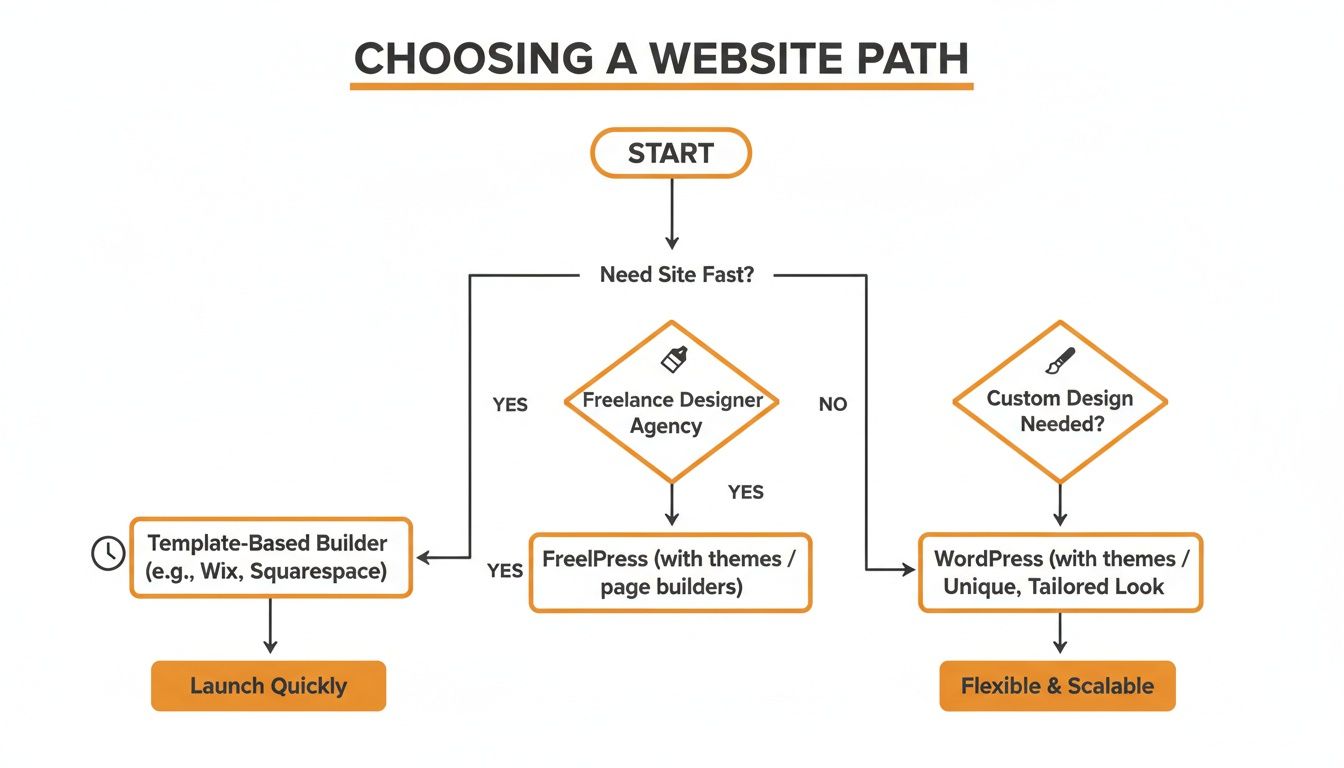
As the flowchart shows, template-based builders like Wix Studio are the sweet spot when you need a professional site quickly but still want the power to customize and grow.
To help you get practical, here's a checklist that breaks down key considerations for different types of businesses. Use it to evaluate which templates truly have the structure you need.
Template Selection Checklist for Different Business Models
Feature/Consideration | E-commerce Retailer | Professional Service (e.g., Law Firm) | Healthcare Practice (e.g., Dental) |
|---|---|---|---|
Primary Conversion Goal | Product Sales | Lead Generation / Consultations | Appointment Booking |
Product/Service Display | Grid layouts, filters, detailed product pages | Clear service descriptions, case studies | Service pages with patient info, FAQs |
Call-to-Action (CTA) Focus | "Add to Cart," "Buy Now," "Shop Collection" | "Book a Consultation," "Contact Us," "Get a Quote" | "Book an Appointment," "New Patient Forms" |
Trust Signals | Customer reviews, secure payment badges | Testimonials, partner logos, certifications | Patient reviews, staff bios, credentials |
Essential Integrations | Payment gateways, shipping APIs, inventory sync | CRM, scheduling software (e.g., Calendly) | HIPAA-compliant booking, patient portal |
Navigation Structure | Category-based, mega menus | Service-focused, simple top-level navigation | Patient-centric (Services, Our Team, Forms) |
Content Priority | High-quality product images and videos | Persuasive copy, professional headshots | Educational content, office photos |
This table isn't exhaustive, but it should give you a solid framework for looking past a template's surface-level design and judging its functional core.
Key Takeaway: Your template choice is a business decision, not just a design one. The right structure will actively help you convert visitors into customers, whether you're selling products in Santa Monica or booking clients in Hollywood.
This strategic mindset is exactly why Wix Studio templates have become such a game-changer for digital agencies. With Wix holding 13% of the global website builder market, platforms like ours can give clients a head start with over 800 templates built for performance. We see this firsthand with our digital agency Wix Studio template, which provides a rock-solid foundation for custom development and complex API integrations.
And these aren't just for small sites. The fact that Wix powers 10.65% of the top one million websites proves that these template-driven sites can scale to dominate their markets. For more on these trends, you can discover more Wix statistics on ElectroIQ.
Customizing Your Template for Brand and Conversions
Alright, you've picked your Wix Studio template. Now the fun really starts. This is where you take that solid foundation and make it undeniably yours. It’s about much more than just slapping your logo on it and calling it a day; real customization means every single element reflects your brand and is laser-focused on your business goals.

The ultimate goal is to create a seamless journey that guides people to take a specific action. Whether that's booking a consultation for a Pasadena-based consultant or buying a product from a DTLA shop, every button, image, and word needs to have a job to do.
Beyond the Basics: Injecting Brand Personality
Your brand isn't just a logo—it's the whole vibe. It's the feeling people get when they interact with your business, and a Wix Studio template gives you all the tools you need to translate that feeling online. First things first, define your brand’s personality. Are you buttoned-up and professional, or are you more creative and laid-back?
That personality should steer all your design decisions:
Typography: Don't just pick a font that looks cool. Choose one that sounds like you. A law firm might lean into a classic serif to project authority, while a tech startup will probably go for a clean, modern sans-serif.
Imagery: Your photos are telling a story. Ditch the generic stock photos and use high-quality, original images of your products, your team, or your services in the wild. Show people the real deal.
Microinteractions: Think about adding subtle animations or hover effects to buttons and links. It’s these small, polished details that can make your site feel more alive and professional.
When all these elements sing in harmony, you create a brand experience that people remember. If you want to ground your creative choices in solid user experience principles, it’s worth checking out this practical guide to website design best practices.
Designing for Conversions: A Strategic Approach
Let’s be honest: a beautiful website that doesn't bring in business is just an expensive digital brochure. To make your site a revenue-generating machine, you have to think about conversions from the get-go. The responsive editor in Wix Studio is your best friend here, giving you total control over how your site looks and functions on any device.
Start with your hero section—it's the first thing anyone sees. It needs a crystal-clear value proposition and a powerful call-to-action (CTA). Forget vague phrases like "Learn More." Get straight to the point with action-oriented language like "Get Your Free Quote" or "Shop the New Collection."
Pro Tip: Your main call-to-action needs to be visible "above the fold" on both desktop and mobile. I've seen conversion rates plummet when people have to scroll just to find the most important button on the page.
From there, think about the path you want visitors to take. Guide them through your site with intuitive navigation and well-placed CTAs. For example, a service page should always end with a button that takes them directly to a contact or booking form. Don’t make them hunt for it. If you want to go deeper on this, we've put together a full guide on how to create a website that converts visitors.
Finally, plug in the tools you actually use to run your business. Wix Studio makes it simple to add essential apps, from scheduling software to full-blown e-commerce systems. This is how your customized template goes from being a static website to a dynamic business hub that works for you 24/7.
Optimizing for SEO and Peak Performance
Let’s be honest: a stunning website nobody can find is just a digital billboard in the desert. After you’ve customized your Wix Studio template, the real work begins—making sure it attracts search engine traffic and delivers a lightning-fast experience for every visitor. Los Angeles is at the center of our service area, and we proudly support clients across a wide network of surrounding cities and neighborhoods throughout Southern California. Our reach includes every corner of L.A.—from Downtown Los Angeles, Hollywood, West Hollywood, Beverly Hills, and Santa Monica to the beach communities of Malibu, Venice, Marina del Rey, Hermosa Beach, Manhattan Beach, and Redondo Beach. We also extend service through the San Fernando Valley, including Sherman Oaks, Studio City, Encino, Van Nuys, North Hollywood, Burbank, Glendale, Pasadena, Woodland Hills, Chatsworth, Canoga Park, Reseda, Northridge, and Tarzana. In the San Gabriel Valley, we work with clients in Alhambra, Monterey Park, San Gabriel, Temple City, Rosemead, Arcadia, El Monte, South El Monte, West Covina, Covina, Baldwin Park, Azusa, Glendora, Duarte, and Monrovia. Farther southeast, we serve Whittier, Pico Rivera, Downey, Norwalk, La Mirada, La Habra, and Cerritos. We also support the South Bay—including Torrance, Carson, Gardena, Hawthorne, Inglewood, and Long Beach—as well as the Gateway Cities and communities throughout the I-10, I-5, 101, and 405 corridors. Whether you’re in a major metro area or a smaller surrounding neighborhood, our team delivers reliable, high-quality service anywhere in or around Los Angeles.
Fortunately, Wix Studio comes loaded with a powerful suite of built-in SEO tools. You get granular control over how search engines see your site, all without needing to be an SEO guru to get started. You just have to be intentional.
Mastering On-Page SEO in Wix Studio
First things first: you need to nail the fundamentals of on-page SEO. Wix Studio makes this surprisingly simple by giving you direct access to the most important elements right from the editor. No code, no headaches.
Here’s a quick checklist to get you rolling:
Meta Titles and Descriptions: Write unique, compelling titles and descriptions for every single page. Think of these as your site's elevator pitch in the search results—make them count.
URL Slugs: Keep your URLs clean, short, and descriptive. A URL like is worlds better than .
Header Tags (H1, H2, H3): Structure your content logically. Your H1 is your main page title, with H2s and H3s breaking down the subtopics. It’s a roadmap for both users and search engines.
Image Alt Text: Add descriptive alt text to every image. This is a double win: it helps search engines understand your visuals and is absolutely critical for accessibility.
These foundational steps are non-negotiable if you want to rank well. If you're ready to go deeper, our practical guide to mastering Wix Studio SEO covers more advanced strategies.
Wix Studio's SEO dashboard pulls all these controls into one place, making it easy to manage everything from meta tags to structured data and redirects.
This centralized approach means you can implement and track your on-page optimizations without jumping between a dozen different tools.
Pushing for Peak Performance and Speed
In today's world, speed is everything. A slow-loading website is a surefire way to kill conversions. Study after study shows that if a page takes more than a few seconds to load, a huge chunk of visitors will just bounce. Whether your customer is in a high-rise in Long Beach or a coffee shop in Burbank, they expect a fast, seamless experience.
Key Insight: Site speed isn't just a user experience metric anymore; it's a confirmed ranking factor for Google. A faster site can directly lead to better visibility in search results.
Wix Studio is built on a high-performance infrastructure designed for speed, but how you build your site still matters. There are a few things you should always do to keep your site running lean and mean.
Actionable Speed Tips:
Optimize Your Images: This is the big one. Before you upload anything, compress your images using a tool like TinyPNG. Large, unoptimized images are the number one cause of slow load times.
Use the Wix Video Player: If you’re embedding videos, use Wix's native player. It’s built for performance and won't drag your page speed down the way some third-party embeds can.
Limit Third-Party Apps: Every app you add brings more code to your site. Be selective and only install the ones you absolutely need to keep your site lightweight.
Once you launch, make a habit of testing your site's speed with Google PageSpeed Insights. It gives you a detailed report card and specific recommendations for improvement, helping you maintain a high-performance website that keeps users happy and engaged.
Your Pre-Launch Checklist to Avoid Common Pitfalls
The moment you’ve been waiting for is almost here—launch day. But before you pop the champagne and hit that big, beautiful "Publish" button, it’s time for one last, meticulous quality check. Trust me, a flawless launch sets the stage for success, making sure your new Wix Studio template performs perfectly from the second it goes live.
This final review isn’t just about catching a few typos. It’s about heading off the common pitfalls I’ve seen undermine countless otherwise great websites. Rushing this last step is a classic mistake that can lead to broken user experiences, lost leads, and a first impression you can't take back.
Technical and Functional Checks
First up, let's get technical. Your site needs to work flawlessly for every single visitor, no matter how they find you. That means every button, form, and link has to do its job without a hitch.
Here’s your technical to-do list:
Test Every Link: Click on everything. Seriously. Hunt down any broken links (the dreaded 404s) and double-check that external links open in a new tab. You don't want to accidentally send people away from your brand-new site.
Submit All Forms: Fill out and submit every contact form, quote request, and newsletter signup on your site. Confirm the submissions actually land in your inbox and that the "thank you" message or page pops up as expected.
Verify Social Links: It’s a small detail that’s surprisingly easy to overlook, but make sure all your social media icons point to the right profiles.
Pro Tip: Don’t forget to set up a custom 404 "page not found" error page. It’s a golden opportunity to guide lost visitors back to your homepage or other key content instead of letting them hit a dead end.
User Experience and Mobile Readiness
With more people browsing on their phones than ever, mobile readiness isn't just a nice-to-have; it's non-negotiable. Your Wix Studio site has to deliver a seamless experience on any device, from a tiny smartphone to a huge desktop monitor.
Wix Studio templates are a massive advantage here, especially for businesses focused on conversions. This is backed by Wix's impressive 45% market share among dedicated website builders, which power over 8 million live sites. As Wix heads toward 250 million users by 2025—with 22 million mobile sites already active—a top-notch responsive experience is your ticket to capturing a piece of that massive audience.
To make sure you're ready, test your site on different devices and browsers. Pay close attention to:
Layout and Readability: Does the text wrap correctly? Are images scaled properly? Is the font size easy to read on a small screen without pinching and zooming?
Navigation: Is the mobile menu easy to find and use? Can visitors get to every page without getting stuck?
Load Speed: Check how fast your site loads on both Wi-Fi and a cellular connection. Slow load times are a surefire way to frustrate visitors and send them packing.
Analytics and Accessibility
Finally, let’s make sure you can measure your success and that your site is open to everyone. One of the most common launch-day blunders is forgetting to connect analytics. Without data, you’re just guessing.
The final steps:
Connect Google Analytics: This is your command center for tracking traffic, understanding user behavior, and measuring conversion goals. Don’t launch without it.
Submit Your Sitemap: Head over to Google Search Console and submit your XML sitemap. This gives search engines a roadmap to crawl and index your new site more efficiently.
Review Accessibility: Use Wix’s built-in Accessibility Wizard to scan for issues like poor color contrast or missing alt text. An accessible site isn't just better for users—it's better for SEO, too.
To keep things organized, I’ve put together a simple table you can use to track your progress.
Essential Pre-Launch Website Checklist
This checklist is your final sanity check before going live. Run through each item to ensure you've covered all the critical details for a smooth and professional launch of your Wix Studio website.
Checklist Item | Status (To Do / Complete) | Notes & Best Practices |
|---|---|---|
Link Integrity | Click every internal and external link. Ensure external links open in a new tab. | |
Form Functionality | Submit all forms (contact, newsletter, etc.) and confirm receipt of submissions. | |
Social Media Links | Verify all social icons link to the correct, active profiles. | |
Custom 404 Page | Create a helpful "Page Not Found" page to guide lost visitors. | |
Mobile Responsiveness | Test on multiple devices (phones, tablets) and browsers (Chrome, Safari, Firefox). | |
Mobile Navigation | Ensure the mobile menu is intuitive and fully functional. | |
Page Load Speed | Test site speed on both Wi-Fi and cellular data connections. | |
Google Analytics | Connect your site to Google Analytics for traffic and behavior tracking. | |
Sitemap Submission | Submit your XML sitemap to Google Search Console. | |
Accessibility Scan | Use the Wix Accessibility Wizard to identify and fix common issues. |
By working through this checklist, you can launch your site with the confidence that comes from knowing you’ve nailed the details that separate a truly professional website from an amateur one. Good luck
Got Questions About Wix Studio Templates? We've Got Answers.
Jumping into a new platform like Wix Studio always brings up a few questions. As you get ready to start your build, you're probably wondering about some of the finer points of the process and the platform itself. We've been there, and we've gathered the most common questions we hear from businesses to give you clear, no-fluff answers.
Let's clear the air so you can move forward with total confidence.
What’s the Real Difference Between Wix and Wix Studio?
This is a big one, and it's crucial to get it right. Think of it this way: Wix is built for the end-user—the small business owner, the artist, or the blogger who needs a straightforward, DIY website builder. It’s incredibly user-friendly and perfect for getting a site up and running on your own.
Wix Studio, however, is a different beast entirely. It’s built for agencies and professionals. It's a more advanced, collaborative workspace packed with sophisticated design tools, responsive AI, and the power to manage multiple client sites from a single dashboard. A Wix Studio template is your starting point inside this professional-grade ecosystem.
Can I Just Use a Regular Wix Template in Wix Studio?
Straight answer: no. You can't directly bring a classic Wix template into the Wix Studio editor. They're built on completely different technologies.
Wix Studio templates are specifically engineered to work with its advanced features—things like the responsive AI editor, custom CSS grids, and collaborative tools. To really tap into what Studio can do, you have to start with a template built for that environment.
How Are Template Updates Handled?
This is one of the best parts of working inside a platform like Wix Studio. The core technology is constantly being updated behind the scenes. You don't have to stress about manual plugin updates or security patches that could break your site, which is a common headache on other platforms.
Key Takeaway: Wix manages all the heavy lifting with platform-level updates, keeping your site's foundation secure and up-to-date. When new features are rolled out in the editor, they become available for you to use, but they won't ever change your existing design automatically. You're always in control.
Can I Bring My Existing Domain Over to My New Site?
Absolutely, and the process is pretty painless. Whether your domain is registered with GoDaddy, Namecheap, or another registrar, you can connect it to your new Wix Studio site.
Wix gives you step-by-step guides that walk you through updating your DNS settings to point the domain to their servers. Once that's done, your new website will be live at your custom URL.
Ready to build a website that not only looks incredible but also drives real business results? At DLL Studios, we specialize in creating high-performing websites using the power and flexibility of Wix Studio. Let's build your brand's future together.

